Cum deschidem fereastra Date and Time din Run
Pentru a deschide fereastra Date and Time din Run trebuie sa folosim comanda timedate.cpl.
[mai mult...]
Soluții pentru problemele tale IT

Pentru a deschide fereastra Date and Time din Run trebuie sa folosim comanda timedate.cpl.
[mai mult...]De obicei pentru a schimba o partitie in CMD folosim comanda litera partitiei (de exemplu D) urmata de :.

Dar putem ajunge la acelasi rezultat folosind si comanda change directory (cd).
By taking control of your microphone settings, you’re not just affecting the sound – you’re shaping how listeners perceive you and your content. It’s a simple step that can take your voice from background noise to center stage.
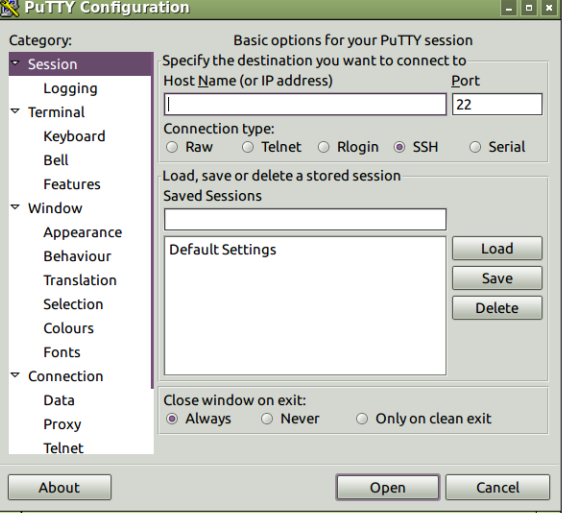
Before connecting to a serial port, you must start PuTTY as a superuser (or as root user) using following command. This command opens the putty configuration dialog box.
$ sudo putty
In the above dialog box:
Steps 1-3 opens a new window to receive serial data from the DRIVE platform.
[mai mult...]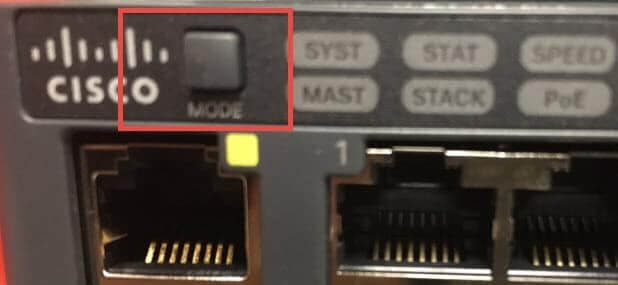
The following will be prompted :
Using driver version 1 for media type 1 Base ethernet MAC Address: 4c:30:2d:81:ef:80 Xmodem file system is available. The password-recovery mechanism is enabled. The system has been interrupted prior to initializing the flash filesystem. The following commands will initialize the flash filesystem, and finish loading the operating system software: flash_init boot switch:
2. Run the following command to initialize the flash file system: Switch:flash_init
switch: flash_init
Initializing Flash…
mifs[2]: 10 files, 1 directories
mifs[2]: Total bytes : 1806336
mifs[2]: Bytes used : 612352
mifs[2]: Bytes available : 1193984
mifs[2]: mifs fsck took 1 seconds.
mifs[3]: 0 files, 1 directories
mifs[3]: Total bytes : 3870720
mifs[3]: Bytes used : 1024
mifs[3]: Bytes available : 3869696
mifs[3]: mifs fsck took 0 seconds.
mifs[4]: 5 files, 1 directories
mifs[4]: Total bytes : 258048
mifs[4]: Bytes used : 9216
mifs[4]: Bytes available : 248832
mifs[4]: mifs fsck took 0 seconds.
mifs[5]: 5 files, 1 directories
mifs[5]: Total bytes : 258048
mifs[5]: Bytes used : 9216
mifs[5]: Bytes available : 248832
mifs[5]: mifs fsck took 1 seconds.
— MORE —
mifs[6]: 566 files, 19 directories
mifs[6]: Total bytes : 57931776
mifs[6]: Bytes used : 28429312
mifs[6]: Bytes available : 29502464
mifs[6]: mifs fsck took 21 seconds.
…done Initializing Flash.


  3.  Delete the config.text file from the flash directory:
switch: del flash:config.text
Are you sure you want to delete “flash:config.text” (y/n)?y
File “flash:config.text” deleted
And Finally, Delete the vlan.dat file from the flash directory and reboot the system
switch: del flash:vlan.dat
Are you sure you want to delete “vlan.dat” (y/n)?y
File “flash:vlan.dat” deleted
To reboot the system:
switch: boot
Loading "flash:c2960s-universalk9-mz.122-58.SE2.bin"…
— System Configuration Dialog —
Enable secret warning
———————————-
In order to access the device manager, an enable secret is required
If you enter the initial configuration dialog, you will be prompted for the enable secret
If you choose not to enter the intial configuration dialog, or if you exit setup without setting the enable secret,
please set an enable secret using the following CLI in configuration mode-
enable secret 0 <cleartext password>
———————————-
Would you like to enter the initial configuration dialog? [yes/no]:
% Please answer 'yes' or 'no'.
| Configure Cisco switch | |
|---|---|
| Execution mode | Script execution mode |
| Description | This Configlet is used to configure Cisco switch along with basic configuration commands |
| Configlet content | configure terminal hostname cisco_switch_x interface vlan ip address 172.16.29.10 255.255.0.0 exit enable secret P@$$w0^d username admin privilege 15 password P@$$w0^d ip default-gateway 172.16.29.1 show ip route ip route 172.16.29.59 255.255.0.0 show running-config interface fastethernet 0/1 description Development VLAN duplex full exit exit write memory |
The above table shows how the configuration commands will appear on Network Configuration Manager’s Configlet command tab.
[mai mult...]