How to use the head Command on Linux
[mai mult...]

Soluții pentru problemele tale IT

[mai mult...]
To install the Windows Subsystem for Linux (WSL) on Windows 11, run Terminal as administrator, then enter “wsl –install” into the window. Run “wsl –install -d Distro”, replacing “Distro” with the name of a Linux distro, to install a specific distribution instead of Ubuntu. You can install additional Linux distros from the Terminal or the Microsoft Store.
The Windows Subsystem for Linux (WSL) lets you run Linux software on your Windows 11 PC. When you enable WSL, Windows will install a custom-built Linux kernel. You can then install Ubuntu or another Linux distribution of your choice.
[mai mult...]You can have apps, documents, folders, or server connections open automatically whenever you log in to your Mac.
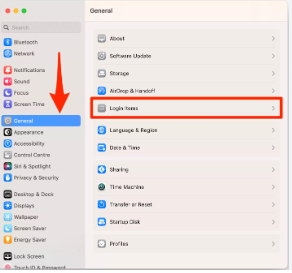
If your Mac has multiple users, you should set up an account for each person so each can personalize settings and options without affecting other users. You can let occasional users log in as guests without access to other users’ files or settings. You can also create groups and choose automatic login options. You must be an administrator of your Mac to perform these tasks.
Both standard users and administrators can join network account servers.
To change these settings, choose Apple menu  > System Settings, then click Users & Groups
 in the sidebar. (You may need to scroll down.)
