
Situatie
The Vim statusline is endlessly customizable, with a set of standard variables available, plus the ability to host almost anything using Vim script. But all this tweaking still takes effort; effort that others have already gone to, so you don’t have to.
These plugins all offer similar upgrades, with a full-featured, attractive statusline to replace the boring default. Each has its own benefits, though, so be sure to choose the one that suits you best.
Solutie
Powerline, the original fancy statusline
The modern version of Powerline, in fact, is no longer the original, but it derives from it. Initially called vim-powerline, and written in Vim script, the plugin has now migrated to Python and targets more than just Vim, with support for zsh, bash, and tmux too.
Once installed, it adds a nice-looking statusline with a command indicator, git integration, file name, type, and the standard ruler details.
You can configure Powerline’s looks and its behavior by editing files inside a ~/.config/powerline directory. Top-level settings are in config.json, while the themes/ and colorschemes/ directories contain more granular config (some of it organized by client, e.g., “vim/”).
Your powerline root contains a default config directory you can use to get started. The location is environment specific, but for me, this involved a cp -r ~/Library/Python/3.9/lib/python/site-packages/powerline/config_files/ ~/.config/powerline.
You can edit any of these config files using Vim, and you’ll see changes immediately, on save. This makes it really quick to test out changes.
Switching themes will populate the statusline with different information; each bit of this is contained in what Powerline calls a “segment.” There are segments available for features like buffer number, CSV column name, file size, and more. You can even use a theme that pimps up the tab bar.
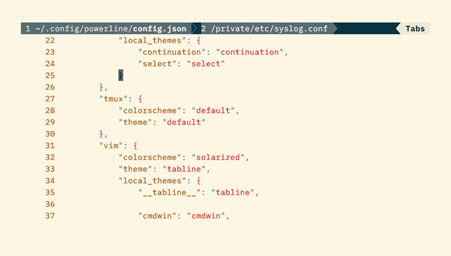
There are only a couple of colorschemes available, but they’re easy to use, and Solarized is included, which I’m a big fan of:

Overall, Powerline is an interesting curiosity, but I wouldn’t advise it as your first choice because installation is a bit awkward, and you may not want all the shell prompt handling that this comes with. I had to install a version of Vim with Python support enabled, then add the following to my ~/.vimrc:
set rtp+=$HOME/Library/Python/3.9/lib/python/site-packages/powerline/bindings/vim
set laststatus=2
That initial path was something I had to discover by running pip show powerline-status. It all works fine now that I’ve set it up, but your own installation will probably be different, and you’ll need a good understanding of your setup to get everything installed smoothly.
lightline.vim, the lightweight competitor
The lightline.vim plugin describes itself as “a light and configurable statusline/tabline plugin for Vim”. After the somewhat bloated feel of Powerline, this feels reassuring. Lightline doesn’t just talk the talk; installation is pretty much as simple as it gets:
git clone https://github.com/itchyny/lightline.vim ~/.vim/pack/plugins/start/lightline
As with Powerline, you won’t notice any change until you use split view or set the statusline to show persistently:
set laststatus=2
Although you can configure lightline.vim, the plugin aims for a good enough default experience that you shouldn’t need to. Configuration isn’t straightforward, and lightline specifically avoids integrating with other plugins to avoid too many dependencies.
lightline.vim has support for several colorschemes (including the ubiquitous Solarized), with a simple setting in your .vimrc to select one, e.g.:
let g:lightline = { ‘colorscheme’: ‘PaperColor’ }
vim-airline, the easy alternative
The vim-airline plugin was designed from the outset to be a lighter option than powerline.
vim-airline is easy to install, with options for various plugin managers, including none at all. I prefer not to use a manager, so I followed the manual instructions that use the pack feature of Vim 8 and later:
git clone https://github.com/vim-airline/vim-airline ~/.vim/pack/dist/start/vim-airline
The plugin automatically sets laststatus, so you don’t need to do that yourself. It also uses automatic truncation, so certain sections of the statusbar can hide when there’s no room for them, depending on configuration. There’s a tab bar available too, and you can theme the statusline with a separate plugin:
vim-airline has seamless integration with a small set of other plugins, so if you use these too—or choose to install them—you should automatically get the benefit of the two combined. These plugins include csv.vim, which vim-airline uses to display row/column information, and vimagit for tight git integration.
Each of these plugins indicates the mode very clearly, and this is one of their best features as far as I’m concerned. I always have trouble keeping track of what mode I’m in, so being able to see it at a glance is a great help.