
Situatie
Most people have at least one old Android phone sitting in a drawer. Maybe the battery is weaker than it used to be, maybe the camera is outdated, or maybe it no longer receives major software updates. That does not mean it is useless.
As long as the phone still turns on, connects to Wi-Fi, and can run basic apps, it can still serve a practical role around the house, in the car, or next to your main PC. The original article focused on Motorola phones, but most of the same ideas work for almost any Android device.
Solutie
Turn It Into a PC Monitoring Screen
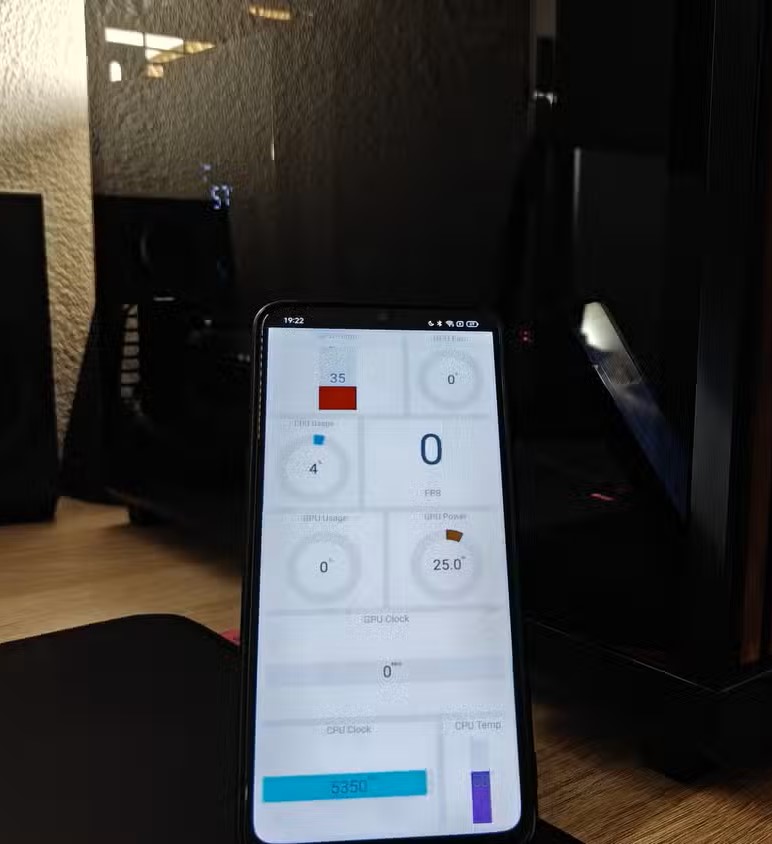
An old Android phone can work well as a small performance dashboard for your computer. Instead of displaying CPU temperature, GPU usage, RAM usage, or fan speeds directly on your main monitor, you can place the phone next to your keyboard or inside your PC setup.
This is especially useful if you play games, edit videos, or run demanding software. You can keep an eye on system performance without using an on-screen overlay that distracts you while working or gaming.
To do this, you usually need a monitoring tool on your PC and a companion app or browser-based dashboard on the phone. The phone does not need to be powerful; it only needs to display live information over Wi-Fi or USB.
Use It as a Dedicated Gaming Handheld
If the phone still has a decent screen and battery, it can become a portable gaming device. You can install Android games directly from the Play Store or use it for game streaming.
For local PC streaming, apps such as Moonlight or Steam Link can let you stream games from your gaming PC to the phone. If your home Wi-Fi is stable, this can work surprisingly well. For cloud gaming, services such as GeForce Now or Xbox Cloud Gaming can also turn the device into a lightweight handheld console.
A clip-on controller makes the setup much better. Instead of using touchscreen controls, you get proper buttons, triggers, and joysticks. Even an older Android phone can feel useful again if its main job is simply to receive a streamed game.
A spare Android phone can also become a simple smart home dashboard. Place it on a stand, keep it connected to power, and use it to control lights, plugs, thermostats, cameras, speakers, or routines. This works best if you already use Google Home, Alexa, Home Assistant, SmartThings, or another smart home platform. The old phone can stay in one place, such as the kitchen, hallway, desk, or bedroom, and act as a control screen for everyone in the house.
You can also use it as a small calendar, weather display, clock, music controller, or family reminder screen. It will not be as polished as a purpose-built smart display, but it is cheaper because you already own it.
Turn It Into a Media Player
One of the easiest uses for an old Android phone is as a dedicated media player. You can use it for music, podcasts, YouTube, Netflix, Plex, Jellyfin, Spotify, or locally stored videos. This is useful if you want a separate device connected to speakers, headphones, a TV, or a bedside stand. You can also use it in the kitchen or garage without risking your main phone.
If the phone supports USB-C video output or you have a Chromecast-compatible setup, it can also become a simple streaming controller. Even if it does not support 4K perfectly, it is usually more than enough for music, podcasts, and casual video playback.
An old Android phone can work as a remote control for your computer. Apps such as KDE Connect, Unified Remote, Chrome Remote Desktop, or similar tools can let you control your mouse, keyboard, media playback, volume, file transfers, and sometimes even notifications.
This is useful if your PC is connected to a TV, if you watch movies from bed, or if you want a quick way to control music without sitting at your desk. For basic use, the phone only needs to be connected to the same Wi-Fi network as your computer. Once paired, it can act like a wireless touchpad, media remote, or quick-access control device.
An old Android phone can become a dedicated navigation device for your car or bike. Install Google Maps, Waze, HERE WeGo, or another navigation app, add a phone mount, and keep your main phone free for calls, messages, or music.
This is especially useful if the old phone still has GPS and a bright enough screen. You can download offline maps before driving, which helps if you do not want to keep a SIM card inside the old phone.
There are two things to watch out for: heat and battery health. GPS, sunlight, and charging can make an old phone warm. Avoid leaving it permanently plugged in or exposed to direct sunlight for long periods.
Turn It Into a Security Camera or Baby Monitor
A spare Android phone can also become a simple camera for monitoring a room, entrance, garage, pet area, or baby’s room. Apps such as AlfredCamera, Manything, or similar monitoring apps can turn the phone into a Wi-Fi camera.
This works best if the phone is plugged in, placed on a stable stand, and connected to reliable Wi-Fi. It will not replace a proper security system, but it can be useful for basic monitoring. Before using it this way, check the phone’s battery condition. If the battery is swollen, overheating, or unstable, do not leave it plugged in unattended.
Before turning an old Android phone into a permanent gadget, clean it up first. Remove old accounts you do not need, uninstall unnecessary apps, update whatever can still be updated, and reset the phone if you want a fresh start.
Leave A Comment?