
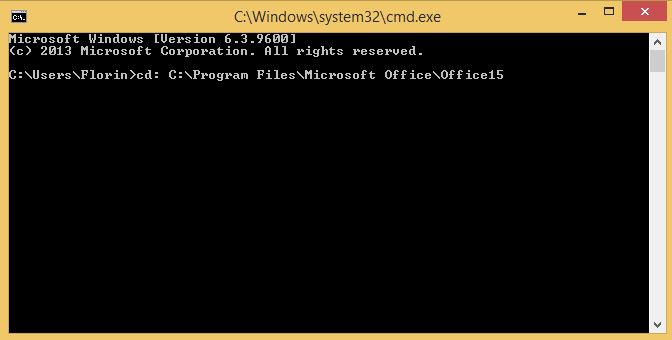
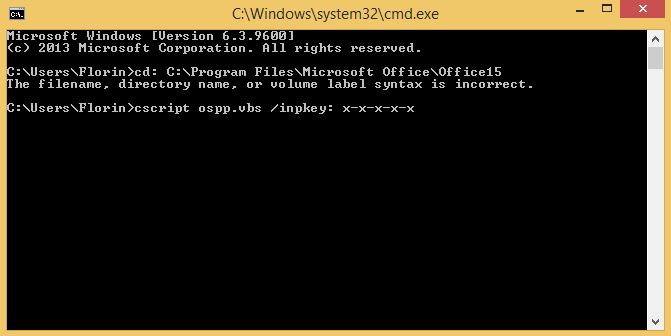
Activare office din command prompt folosind scriptul ospp.vbs Data 10/05/2016 Autor Florin Ghe Categorie OS - Windows, Aplicații -5 1308 Configurare noua (How To) SituatieSe doreste activarea din command prompt Solutie Pasi de urmat In command prompt se tasteaza urmatoarea comanda : cd: C:Program FilesMicrosoft OfficeOfficeX Unde X reprezinta varianta de Office instalata. Se tasteaza comanda : cscript ospp.vbs /inpkey: x-x-x-x-x Unde x-x-x-x-x reprezinta licenta. Tip solutiePermanent Voteaza Up Down (14 din 33 persoane apreciaza acest articol) ShareTweetShare Despre Autor Florin Ghe Solutii Asemanatoare Cum dezinstalam eficient aplicatii in Windows 1 After installing Windows 11, the computer boots very slowly and some applications take a long time to open 3 Cum configuram valorile de luminozitate ale ecranului 3 Cum imbunatatim controlul asupra luminozitatii pe statia noastra 1 Fișierele sunt șterse automat pe Windows 11 4 Fișierele de recuperare BIOS nu pot fi găsite sau fișierele sunt corupte 3 Leave A Comment? × Cancel Reply Save my name, email, and website in this browser for the next time I comment. × six = forty eight
Leave A Comment?