
Situatie
In iOS 26, Apple Maps has a feature called Visited Places that when enabled automatically logs where you’ve been, with the aim of making it easier to revisit your favorite spots or to share locations with friends. While it can be useful for tracking your travels, you might prefer to keep your location history private.
Solutie
Pasi de urmat
Open the Settings app on your iPhone.
Tap through to Apps – Maps – Location.
Toggle off the Visited Places switch.
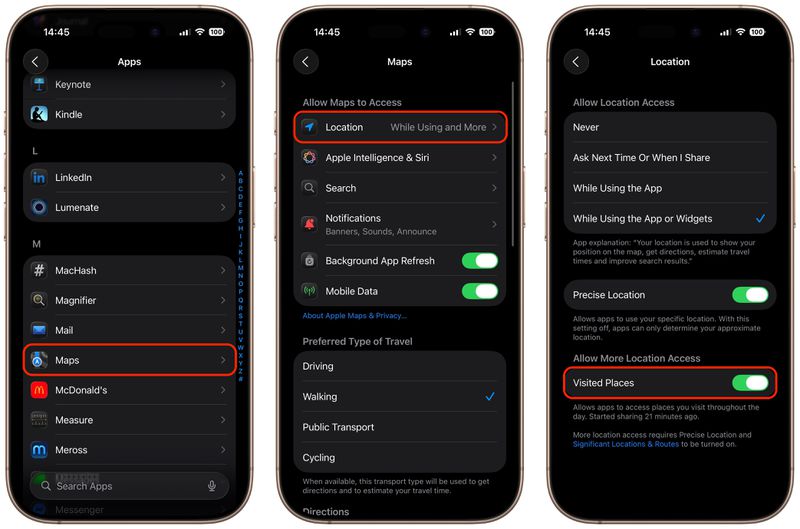
With the toggle disabled, Maps will no longer track the places you visit. Note that you can also access the toggle by going to Privacy and Security – Location Services – Maps.
How to Clear Your Visited Places History
In the Maps app’s Visited Places card, the Keep Visits buttons gives you options to change how long visits are kept (three months, one year, and forever). If you want to delete the entirety of location history, you can also clear it from within the Maps app.
- Open the Maps app on your iPhone
- Tap Places, then tap Visited Places
- Scroll to the bottom, tap Clear History, then tap Clear All
Your visited places history will now be permanently deleted. You can also remove individual locations by tapping More (the three dots) next to any place card and selecting Remove.
Leave A Comment?