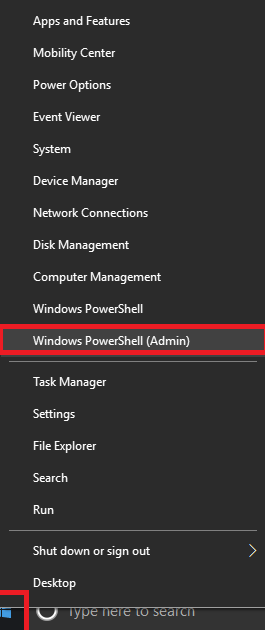
Cum listezi toate driverele instalate pe statie din powershell Data 09/03/2018 Autor Cristian Cz. Categorie OS - Windows -3 1221 Configurare noua (How To) SituatieVrei sa afli toate detaliile despre driverele instalate pe o statie Solutie Pasi de urmat Deschizi powershell: Apesi click dreapta pe butonul start si apoi apesi Windows PowerShell (Admin) tastezi: Get-WindowsDriver –Online -All Tip solutiePermanent Etichetare: AdminAllaskitaskit.roCum listezi toate driverele instalate pe statie din powershellDriversonlinepowershellWindows Powershell Voteaza Up Down (47 din 97 persoane apreciaza acest articol) ShareTweetShare Despre Autor Cristian Cz. Solutii Asemanatoare Funcția UNIQUE nu funcționează în Excel 0 Outlook nu funcționează cu VPN pe PC Windows 4 Bara de volum in Windows 11 apare incontinuu 2 Kubuntu installation guide 0 Cum resetam consumul de date din Windows -1 How to enable new CPU boost feature on Windows 11 0 Leave A Comment? × Cancel Reply Save my name, email, and website in this browser for the next time I comment. one × eight =
Leave A Comment?
