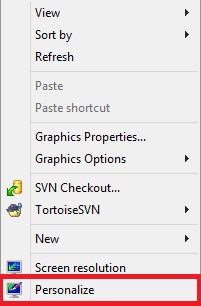
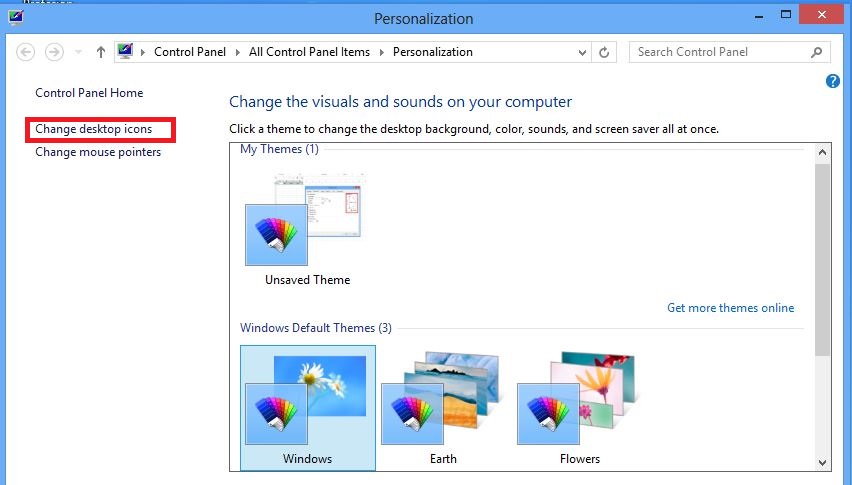
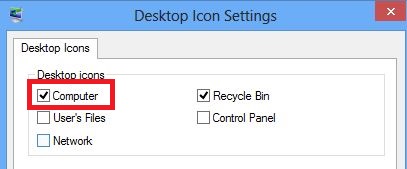
Cum sa afisezi iconita “Computer” pe desktop. Data 13/10/2015 Autor Valentin G Categorie OS - Windows, Personalizare sistem operare, Stații de lucru -5 1066 Configurare noua (How To) SituatieCum sa afisezi “Computer” pe desktop. Solutie Pasi de urmat Se da click dreapta pe desktop si se da click pe “Personalize”. In partea stanga sus se da click pe “Change Desktop Icons”. Se selecteaza bifa “Computer” si se da click pe “Apply”. Tip solutiePermanent Voteaza Up Down (24 din 52 persoane apreciaza acest articol) ShareTweetShare Despre Autor Valentin G Solutii Asemanatoare Windows 11’s predictive text is the hidden typing tool 6 How to quickly fix CSV files in Excel using Power Query -3 Analiza și remedierea Erorii 0x8024200B în Windows Server 2022 3 Analiza și remedierea erorii:„CONFIG INITIALIZATION FAILED” în Windows Server 1 Changing these 3 settings instantly makes your Android phone more private 2 Stop using Rufus to burn ISOs, these 2 tools for Windows and Linux are better 5 Leave A Comment? × Cancel Reply Save my name, email, and website in this browser for the next time I comment. 3 + 8 =
Leave A Comment?
