
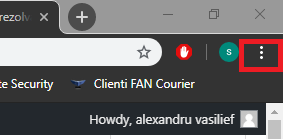
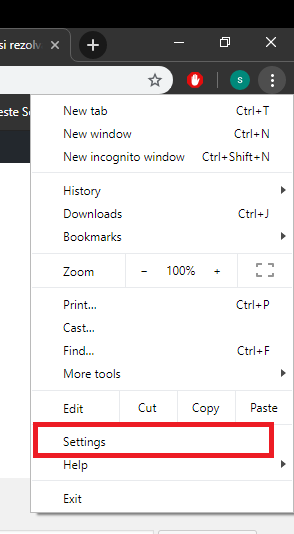
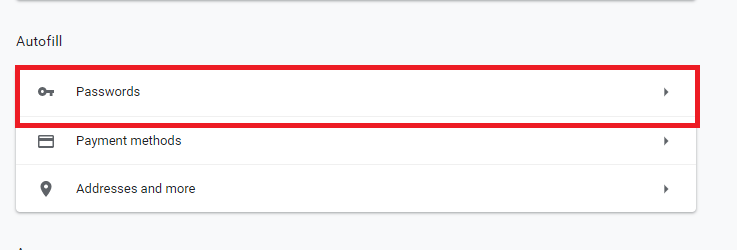
Cum să exporti parolele salvate din Google Chrome Data 05/09/2019 Autor alexandru vasilief Categorie Soluții -5 552 Configurare noua (How To) Situatie Solutie Pasi de urmat Deschideti Google Chrome Click pe cele 3 puncte (se afla in coltul din dreapta sus al ferestrei). Se va deschide un meniu: Selectam Settings: Selectam Passwords: Selectam Export Passwords: Alegem locatia unde dorim sa exportam parolele. Tip solutiePermanent Voteaza Up Down (16 din 36 persoane apreciaza acest articol) ShareTweetShare Despre Autor alexandru vasilief Solutii Asemanatoare How to use System Restore on Windows 10 and Windows 11 5 Cum se instalează Fail2ban pe Rocky Linux 10, 9 și 8? 2 Cum se dezactiveaza SELinux pe Rocky Linux 10, 9 si 8? 4 Cum se instaleaza Remi RPM pe Rocky Linux 10, 9 si 8? 2 Cum rezolvi problema în care calculatorul pornește direct în BIOS 1 Cum rezolvi problema în care Windows nu mai reține poziția iconițelor de pe Desktop 3 Leave A Comment? × Cancel Reply Save my name, email, and website in this browser for the next time I comment. eight − = seven
Leave A Comment?