
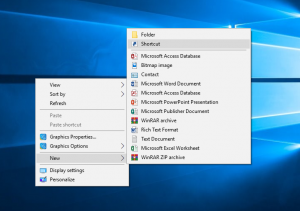
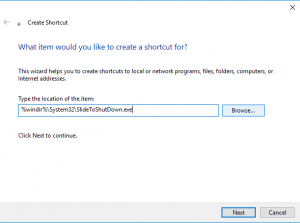
Cum sa faci Slide Shutdown la windows 10 Data 27/08/2018 Autor Stefan Tu. Categorie Windows, File & Sharing -3 1228 Configurare noua (How To) SituatieVrem sa facem slide shutdown la windows 10. Solutie Pasi de urmat Click dreapta pe Desktop, apoi click stanga pe NEW, apoi click stanga pe Shortcut. In chenarul de mai jos scriem urmatoarea comanda: %windir%System32SlideToShutDown.exe apoi dam click stanga pe NEXT: Selectam Finish. Tip solutiePermanent Voteaza Up Down (33 din 69 persoane apreciaza acest articol) ShareTweetShare Despre Autor Stefan Tu. Solutii Asemanatoare Cum se remediază eroarea:„Remote Desktop can’t find the Computer” în Windows 5 Configurare NAS (OpenMediaVault) – Centralizarea datelor și Backup 3 Cum accelerați transferurile FTP cu FileZilla 1 How to configure a Synology and what you can do with it -7 How to first time connect and configure a Synology NAS -17 Obținerea unei liste cu dispozitivele mobile din Exchange 2016 prin PowerShell -13 Leave A Comment? × Cancel Reply Save my name, email, and website in this browser for the next time I comment. nine − eight =
Leave A Comment?