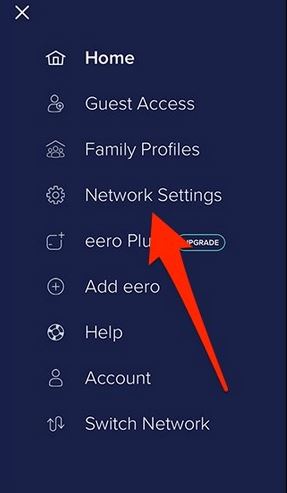
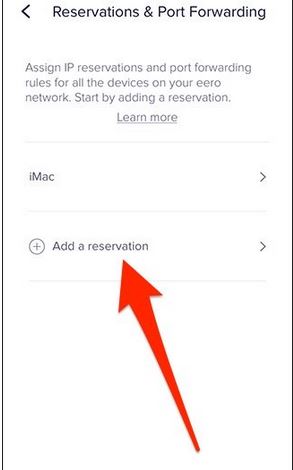
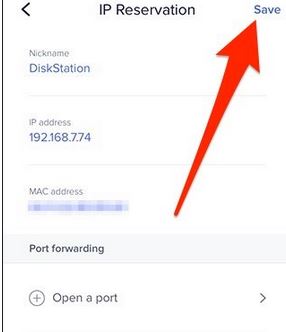
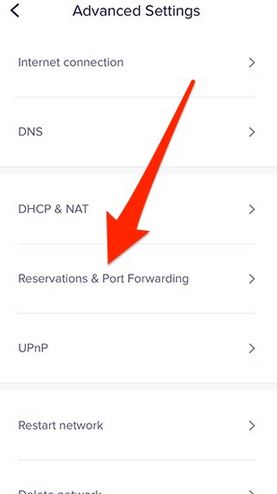
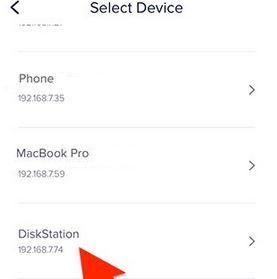
Cum sa setezi un ip static pe un router eero Data 04/04/2018 Autor Robert Ci. Categorie Aplicatii specifice -13 1012 Configurare noua (How To) SituatieIn acest tutorial vom invata cum se poate seta un ip static pe un router eero Solutie Pasi de urmat Se acceseaza meniul principal si apoi network settings Se acceseaza meniul advanced settings si apoi meniul reservations & port forwarding Selectam dispozitivul dorit, adaugam ip ul si salvam setarile Tip solutiePermanent Etichetare: askitaskit.roCum sa setezi un ip static pe un router eeroeeroNetwork Settingsreservations & port forwarding Voteaza Up Down (28 din 69 persoane apreciaza acest articol) ShareTweetShare Despre Autor Robert Ci. Solutii Asemanatoare Windows 11’s predictive text is the hidden typing tool 6 How to quickly fix CSV files in Excel using Power Query -1 Cum folosim Calendly? 0 Configurare Calendly: Manager+Asistent 0 OneDrive Error 0x8004de40: cum rezolvi eroarea de conectare 6 Cum transferi fisierele din OneDrive in Google Drive 1 Leave A Comment? × Cancel Reply Save my name, email, and website in this browser for the next time I comment. three × = twenty four
Leave A Comment?