
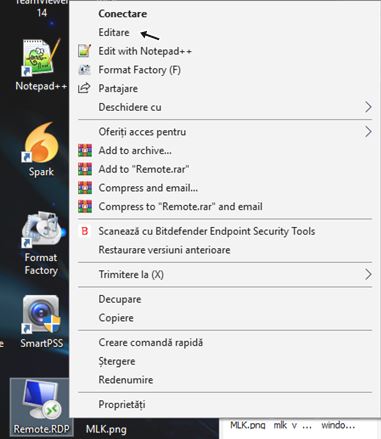
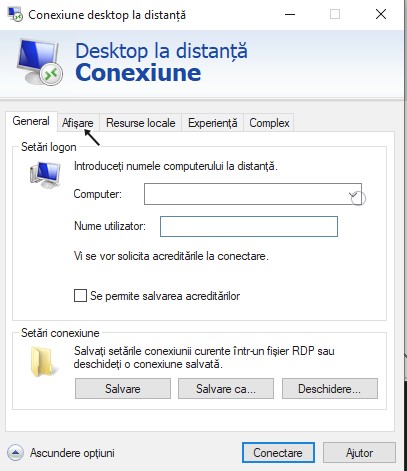
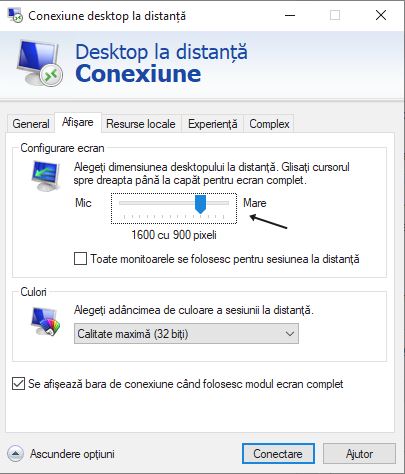
Cum utilizezi Remote Desktop Connection in full screen Data 05/04/2019 Autor iulian carp Categorie Soluții -6 1160 Configurare noua (How To) SituatieAvem nevoie sa utilizam Remote Desktop Connection in full screen. Solutie Pasi de urmat Dam un click dreapta pe iconita noastra de remote si selectam EDITARE. S-au deschis optiunile pentru RD, mergem la optiunea AFISARE. La configurare ecran, tragem sageata la maxim spre dreapta. Revenim la tabul GENERAL si salvam setarile. Tip solutiePermanent Etichetare: Connectiondesktopfullremotescreen Voteaza Up Down (31 din 68 persoane apreciaza acest articol) ShareTweetShare Despre Autor iulian carp Solutii Asemanatoare Cum activati un profil custom pe Antivirusul Bitdefender 1 Check who’s using your iPhone Hotspot Data 2 Funcția UNIQUE nu funcționează în Excel 3 Outlook nu funcționează cu VPN pe PC Windows 3 Bara de volum in Windows 11 apare incontinuu 5 Kubuntu installation guide -1 Leave A Comment? × Cancel Reply Save my name, email, and website in this browser for the next time I comment. three − = 0
Leave A Comment?