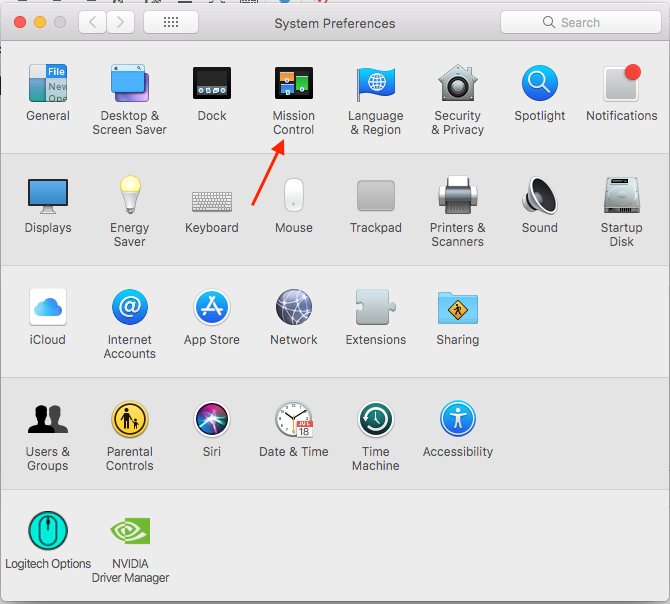
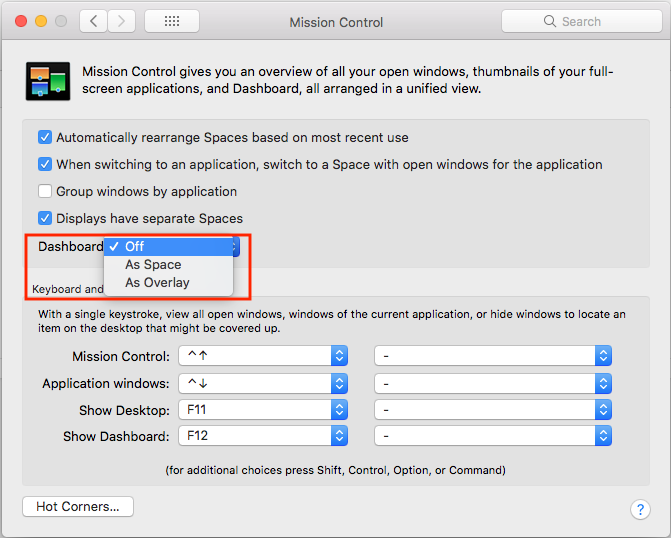
Dezactivare Dashboard pe macOS Data 20/05/2018 Autor Valentin Pifu Categorie Soluții -5 748 Configurare noua (How To) SituatieCum puteti sa dezactivati Dashboard-ul in sistemul de operare macOS. Solutie Pasi de urmat Deschideti “System Preferences”. Intrati in “Mission Control”. Setati la “Dashboard” – “Off”. Tip solutiePermanent Voteaza Up Down (16 din 38 persoane apreciaza acest articol) ShareTweetShare Despre Autor Valentin Pifu Solutii Asemanatoare Cum activati un profil custom pe Antivirusul Bitdefender 2 Check who’s using your iPhone Hotspot Data 0 Funcția UNIQUE nu funcționează în Excel 2 Outlook nu funcționează cu VPN pe PC Windows 0 Bara de volum in Windows 11 apare incontinuu 3 Kubuntu installation guide -1 Leave A Comment? × Cancel Reply Save my name, email, and website in this browser for the next time I comment. eight × three =

Leave A Comment?
