
Situatie
VMD (Volume Management Device) is a feature available on some Intel-based ASUS motherboards. It can help manage NVMe storage devices and is commonly used when configuring or installing Windows.
1 You need to turn on the computer and wait for the ASUS logo to appear on the screen.
2 Enter the BIOS as soon as the computer starts and repeatedly press the Delete.
3 When the BIOS opens, you may be in EZ Mode, so you need to press F7 to switch to Advanced Mode
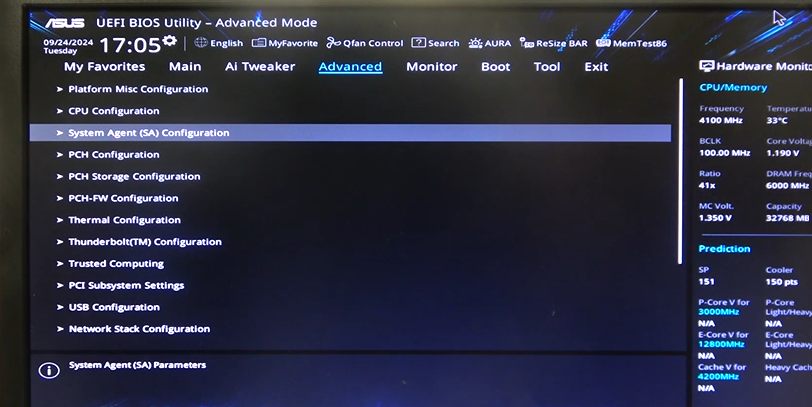
4 In this section, select the Advanced tab at the top of the screen, then click on System Agent (SA) Configuration
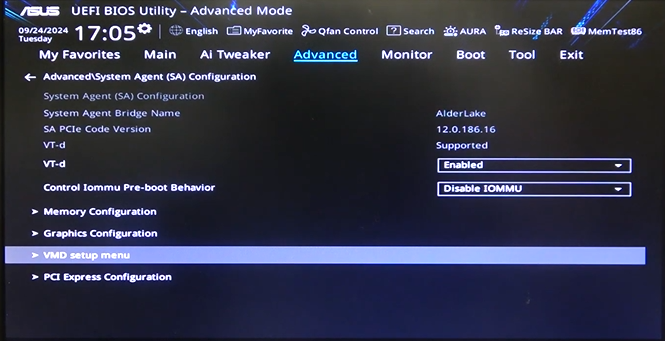
5 Inside this settings, you need to click on VMD setup menu, then you will find Enable VMD Controller. Change its settings to Enabled then you need to confirm and restart the PC.
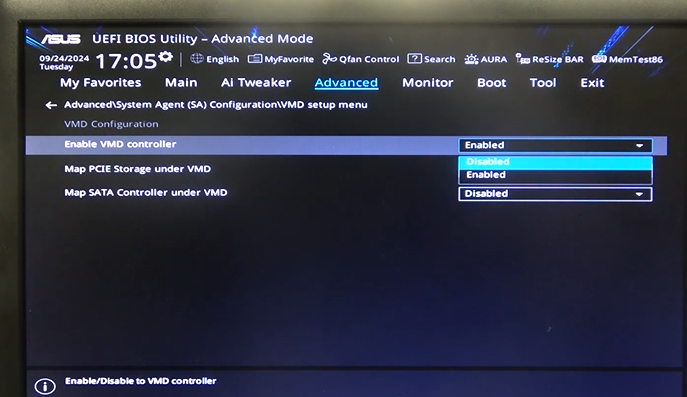
After enabling VMD, the system can manage compatible NVMe storage devices through the VMD controller.
Leave A Comment?