Follow Us

Soluții pentru problemele tale IT

Home /Windows Server/Active Directory/How to check Failed Login attempts in Windows Server 2012 R2
Home /Windows Server/Active Directory/Depanare Domain User account lockout cu ajutorul Event Viewer/How to check Failed Login attempts in Windows Server 2012 R2
Home /Windows Server/Group Policy/How to check Failed Login attempts in Windows Server 2012 R2
Home /Soluții /How to check Failed Login attempts in Windows Server 2012 R2
Home /Windows Server /How to check Failed Login attempts in Windows Server 2012 R2

How to check Failed Login attempts in Windows Server 2012 R2

  • Data 02/06/2019
  • Autor Ciprian Zoican
  • Categorie Active Directory, Depanare Domain User account lockout cu ajutorul Event Viewer, Group Policy, Soluții, Windows Server
  • -14
  • 1954
Configurare noua (How To)

Situatie

You can run into a lot of people telling you that the account keeps getting locked out without typing the wrong password.

Here is how to check the reasons for the account lockout if you’re using Windows Server 2012 as an Active Directory.

First thing that needs to be done is to enable auditing for login attemps.

In order to do this, go to Start, and type gpmc to launch Group Policy Management Console.

Here, you can either edit your Default Domain Policy, or create a new policy.

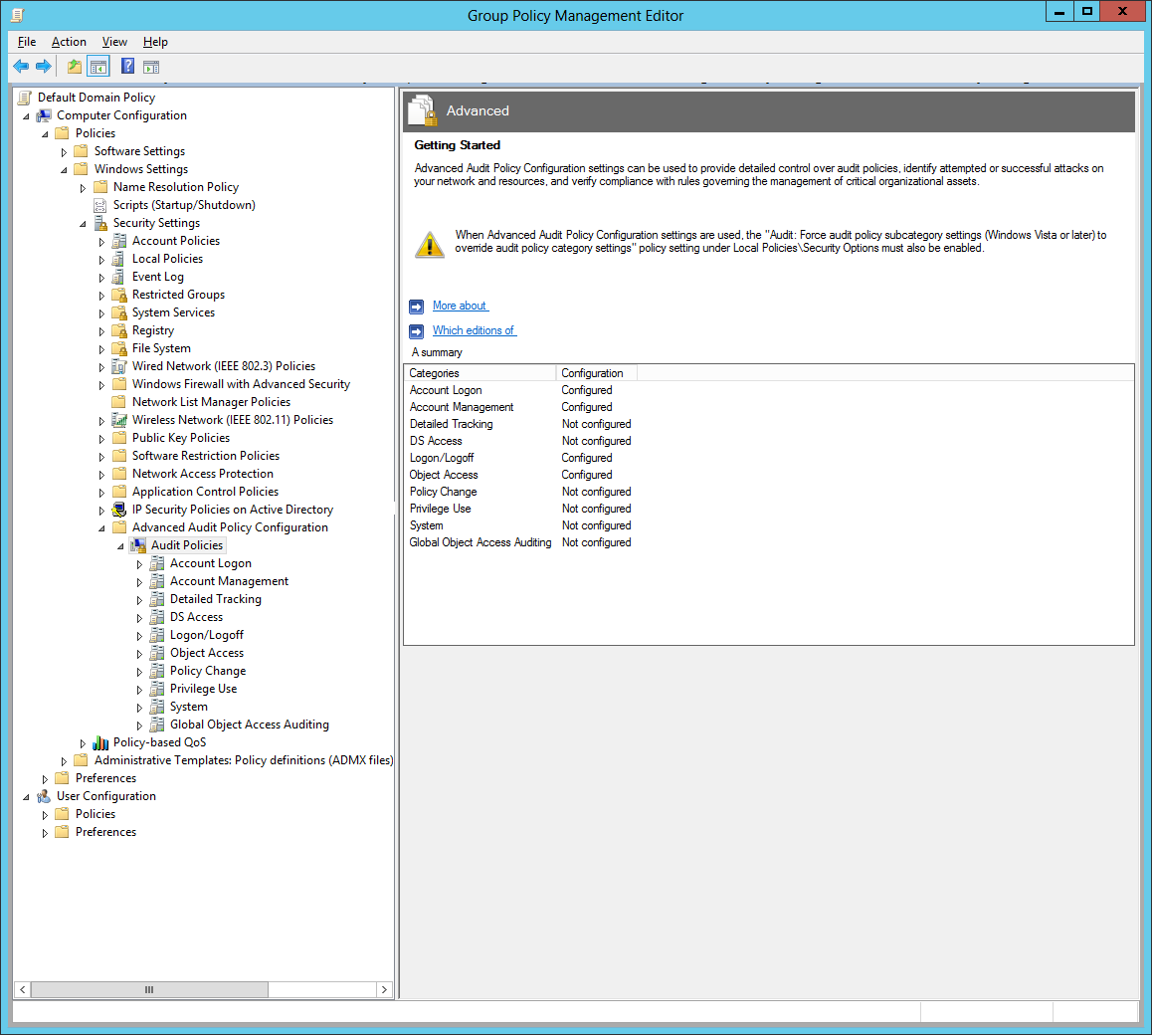
Either way, in the Group Policy Management Editor, go to Computer Configuration >Policies >Windows Settings > Security Settings >Advanced Audit Policy Configurator >Audit Policies

All the audit policies are on the right pane. Here,you have to enable the following policies for Successful and Failed events

-In Logon/Logoff – Enable Audit Logon

– In Object Access enable Audit Detailed File Share; Audit File Share; Audit File System

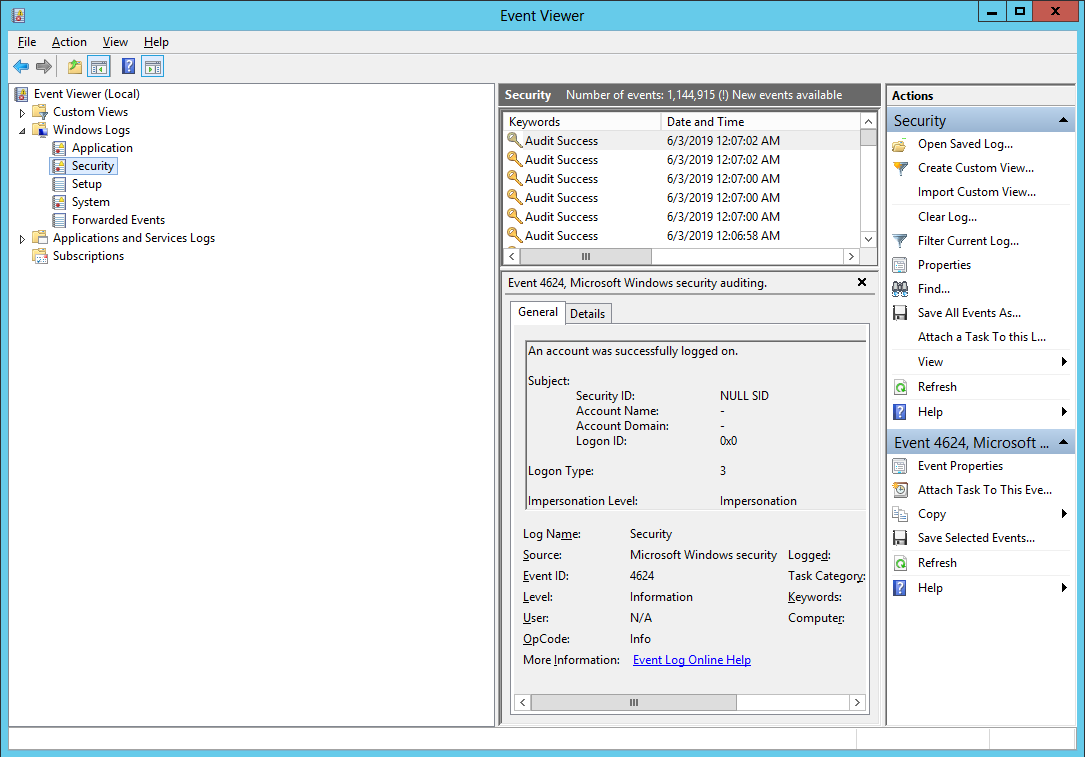
After applying these policies, you can check the login attempts by using Event Viewer and navigating to

Windows Logs >Security on the left pane.

Solutie

Tip solutie

Permanent
Etichetare: AuditingLocked out

Voteaza

Up Down
(39 din 92 persoane apreciaza acest articol)
Share
Tweet
Share

Despre Autor

Ciprian Zoican

Solutii Asemanatoare

  • Cum îți organizezi documentele și contractele agricole în cloud pentru acces rapid 2
  • Cum îți creezi un sistem simplu de monitorizare a fermei folosind senzori IoT și telefonul mobil 3
  • Cum creezi materiale educaționale pentru agricultură folosind inteligența artificială 2
  • Cum folosești aplicații meteo avansate pentru a planifica lucrările agricole mai eficient 0
  • Cum îți creezi o hartă digitală a terenurilor agricole folosind Google My Maps 2
  • Cum folosești Google Sheets pentru a ține evidența producției agricole și a cheltuielilor 2

Leave A Comment? × Cancel Reply

31228

Soluții Disponibile

0 Articole

In ultima saptamana

Cele mai recente soluții

  • Cum îți organizezi documentele și contractele agricole în cloud pentru acces rapid
    • 20
    • 18 hours ago
  • Cum îți creezi un sistem simplu de monitorizare a fermei folosind senzori IoT și telefonul mobil
    • 21
    • 11/03/2026
  • Cum creezi materiale educaționale pentru agricultură folosind inteligența artificială
    • 23
    • 11/03/2026
  • Cum folosești aplicații meteo avansate pentru a planifica lucrările agricole mai eficient
    • 23
    • 11/03/2026
  • Cum îți creezi o hartă digitală a terenurilor agricole folosind Google My Maps
    • 24
    • 11/03/2026
© Askit.ro, 2014 - 2026. All rights reserved. Done by Class IT
Share
Tweet
Share