
Situatie
To factory reset Windows 11, erasing everything on the hard drive, follow these steps:
Solutie
1. Open Settings on Windows 11
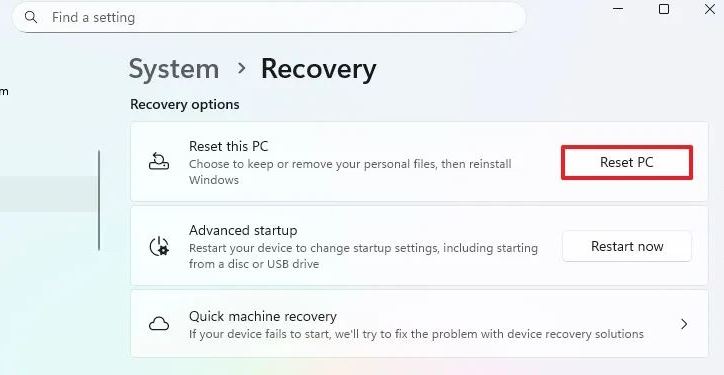
2. Click on System
3. Click the Recovery page
4. Click the Reset PC button in the “Reset this PC” setting under the “Recovery options” section.
5. Click the Remove Everything option.

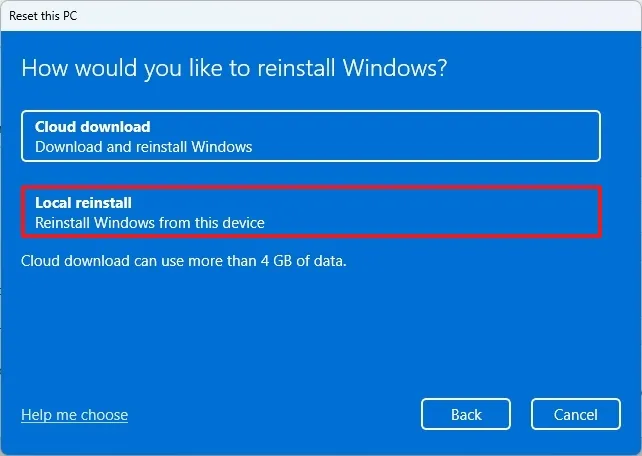
6. Select the “Local reinstall” option to use the local image to reinstall Windows 11, removing everything on the computer.
7. Click the Next button
8. Click the Reset button
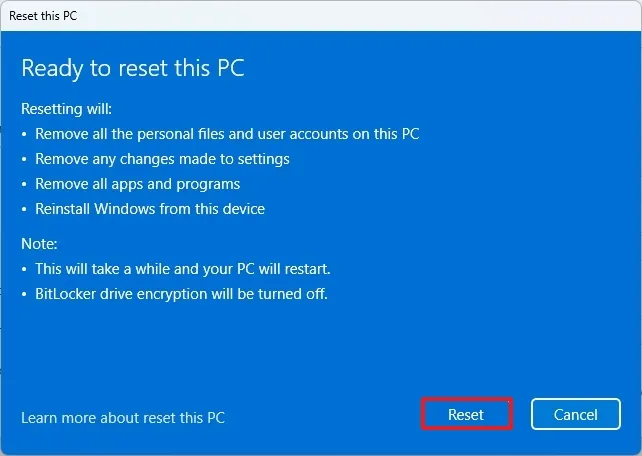
ONCE YOU COMPLETE THE STEPS, THE FEATURE WILL RESET WINDOWS 11 USING THE LOCALLY AVAILABLE IMAGE, ERASING EVERYTHING ON THE HARD DRIVE, INCLUDING FILES, SETTINGS, AND APPS.
Leave A Comment?