
Situatie
Microsoft Excel has a feature called Link Sheet that you can use to link the data on your one workbook to another worksheet. These links automatically update when you change something on the linked workbook.
Solutie
Pasi de urmat
On the Excel worksheet, tap “File” and click “Options” to open it.

- Then, click on the last option on the left-hand pane, “Trust Center“
- On the opposite side of the pane, tap “Trust Settings” to open it on your system.
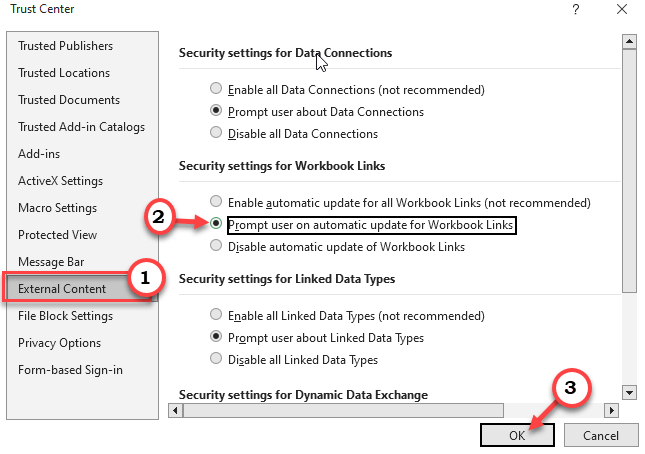
- Next, head on to the “External Content” tab.
There, you will find the Security settings for Workbook Links tab.
Now, set this setting either to “Prompt user on automatic update for Workbook Links” or you can just disable it “Disable automatic update of Workbook Links” as well.
Then, tap “OK” to save the changes.
Now, coming back to the Options screen, tap “OK” to save it finally. After this, you won’t see the banner again.
Leave A Comment?