
Situatie
After installing ollama better to reconfigure ollama to store them in new place right away. So after we pull a new model, it doesn’t get downloaded to the old location.
Solutie
To download some Ollama models: Go to Ollama Library (https://ollama.com/library) and find the model you need, there you can also find model tags and sizes.
Then run:
ollama pull gemma2:latest
# Or get slightly smarter one still nicely fitting into 16GB VRAM:
ollama pull gemma2:27b-instruct-q3_K_S# Or:
ollama pull llama3.1:latest
ollama pull llama3.1:8b-instruct-q8_0
ollama pull mistral-nemo:12b-instruct-2407-q6_K
ollama pull mistral-small:22b-instruct-2409-q4_0
ollama pull phi3:14b-medium-128k-instruct-q6_K
ollama pull qwen2.5:14b-instruct-q5_0
To check the models Ollama has in local repository:
ollama list
To remove some unneeded model:
ollama rm qwen2:7b-instruct-q8_0 # for example
By default the model files are stored:
- Windows: C:\Users%username%.ollama\models
- Linux: /usr/share/ollama/.ollama/models
- macOS: ~/.ollama/models
To create an environment variable on Windows you can follow these instructions:
- Open Windows Settings.
- Go to System.
- Select About
- Select Advanced System Settings.
- Go to the Advanced tab.
- Select Environment Variables….
- Click on New…
- And create a variable called OLLAMA_MODELS pointing to where you want to store the models
Move Ollama models on Linux
Edit the ollama systemd service parameters
sudo systemctl edit ollama.service
This will open an editor.
For each environment variable, add a line Environment under section [Service]:
[Service]
Environment="OLLAMA_MODELS=/specialplace/ollama/models"
Save and exit.
There is also a User and Group params, those must have access to this folder.
Reload systemd and restart Ollama:
sudo systemctl daemon-reload
sudo systemctl restart ollama
if something went wrong
systemctl status ollama.service
sudo journalctl -u ollama.service
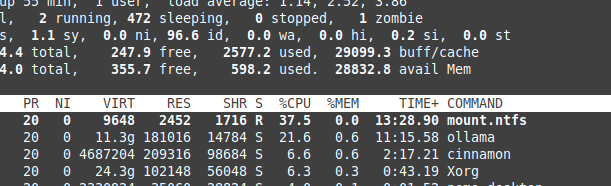
Storing files on NTFS overhead
Please be aware that if you are running linux and keeping your models on NTFS formatted partition, your models would be loading much — more then 20% slower.
Press enter or click to view image in full size
Install Ollama on Windows to specific folder
Together with the models
.\OllamaSetup.exe /DIR=D:\OllamaDir
Expose Ollama API to internal network
Internal here means local network.
Add to service config:
[Service]
Environment="OLLAMA_HOST=0.0.0.0"
Leave A Comment?