
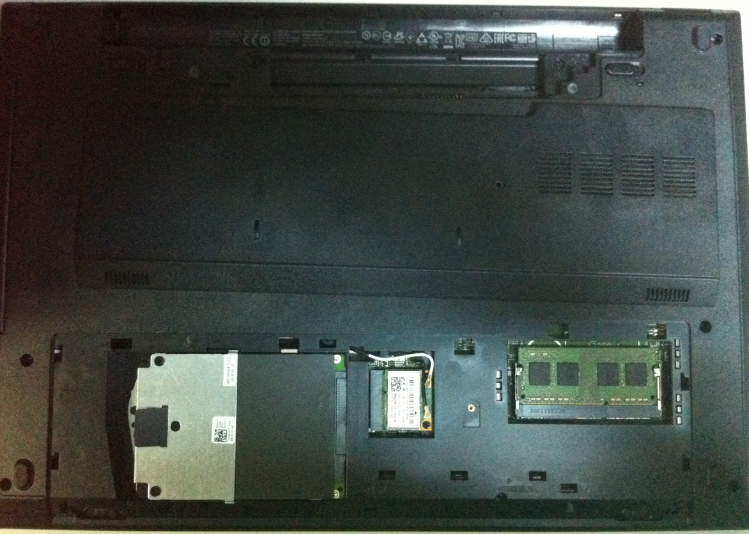
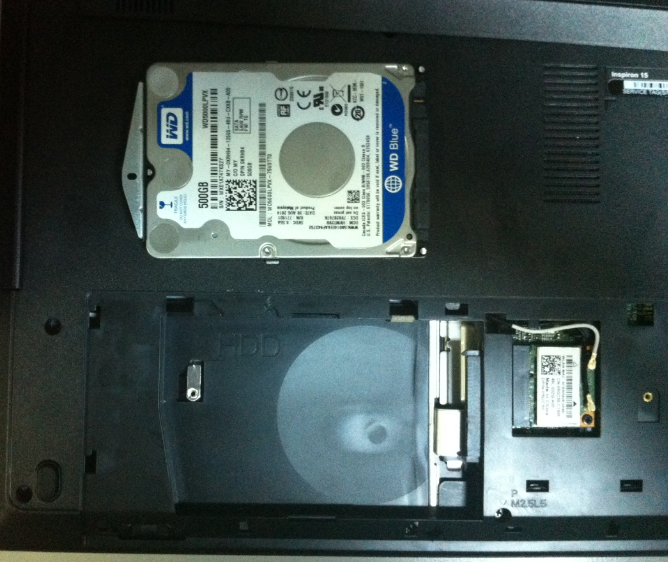
Înlocuire HDD laptop Dell Inspiron 15 Data 15/07/2015 Autor Valentin Bozanchi Categorie Actualizare / Schimbare componente, Hardware, Stații de lucru -4 2033 Configurare noua (How To) SituatieSe înlocuiește HDD echipamentului defect cu unul similar / SSD sau cu unu HDD de capacitate mai mare. Solutie Pasi de urmat Se desfac suruburile incercuite din imaginea de mai jos –> tragem lateral de capacul carcasei care protejeaza HDD –> si inlocuim HDD stricat cu un alt HDD Tip solutiePermanent Voteaza Up Down (33 din 70 persoane apreciaza acest articol) ShareTweetShare Despre Autor Valentin Bozanchi Solutii Asemanatoare Stop using Rufus to burn ISOs, these 2 tools for Windows and Linux are better 2 Tuxedo OS install guide 3 Spyware-ul pe înțelesul tuturor: cum îl eviți? 3 How to enable hidden CPU performance boost mode on Windows 11 3 Cum remediem: you can’t Sign in with this account error In Windows 11 1 Remediere: ASSIGN_DRIVE_LETTERS_FAILED 0 Leave A Comment? × Cancel Reply Save my name, email, and website in this browser for the next time I comment. seven × = 7
Leave A Comment?