
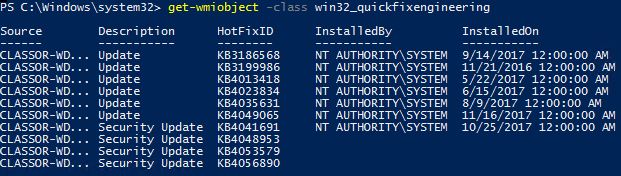
Listare toate update-urile instalate pe Windows cu ajutorul Powershell Data 09/01/2018 Autor Adrian Tu. Categorie Windows Server -14 1129 Configurare noua (How To) SituatieAi un Windows Server si doresti sa vezi toate update-urile instalate pe el. Solutie Pasi de urmat Te loghezi cu user de administrator pe server. Deschizi PowerShell as Administrator. Rulezi urmatoarea comanda : get-wmiobject -class win32_quickfixengineering Tip solutiePermanent Etichetare: askitaskit.roListare toate update-urile instalate pe Windows cu ajutorul Powershellpowershellwindows Voteaza Up Down (25 din 64 persoane apreciaza acest articol) ShareTweetShare Despre Autor Adrian Tu. Solutii Asemanatoare Cum functioneaza Bluetooth? 0 Cum se remediază eroarea:„Remote Desktop can’t find the Computer” în Windows 3 Process Monitor (ProcMon) pentru monitorizarea modificărilor aduse fișierelor și registrului 0 Cum se exportă politicile de acces condiționat din Cloud în format CSV cu PowerShell 1 Diagnostichează probleme Active Directory direct din terminal cu un agent AI 4 Best practice in standardele de monitorizare privind serviciile critice ce pot cauza memory leak 1 Leave A Comment? × Cancel Reply Save my name, email, and website in this browser for the next time I comment. 4 + = ten
Leave A Comment?