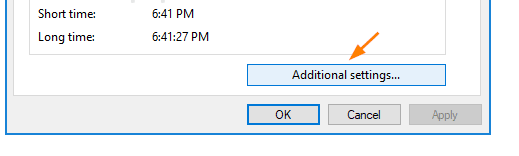
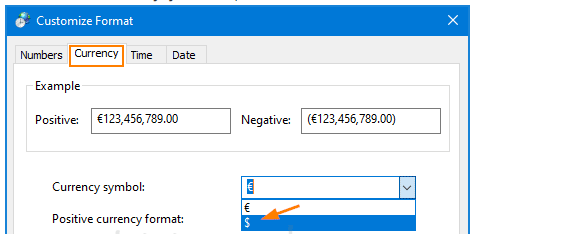
Cum sa schimbi valuta in Windows 10 Data 13/10/2020 Autor Gabriel Burtea Categorie OS - Windows, Soluții, Stații de lucru, Configurare Sistem de operare -12 1058 Configurare noua (How To) SituatieDoresti sa schimbi cum este reprezentata valuta in windows 10. Solutie Apasa tasta windows + R, iar in fereastra deschisa tastam intl.cpl In tabul Formats apasam pe “Additional settings” in partea din dreapta jos Dupa aceea navigam in tab-ul “Currency” si selectam moneda dorita Tip solutiePermanent Voteaza Up Down (23 din 58 persoane apreciaza acest articol) ShareTweetShare Despre Autor Gabriel Burtea Solutii Asemanatoare How to resolve a Windows Update Install Error – 0x80070002 3 Bring your Windows Desktop to life with Wallpaper Engine 5 How to move Taskbar to top or side on Windows 11 3 Reparare eroare:”Trust Relationship Failed” fără scoatere din domeniu și fără restart (PowerShell) 0 You’ve been deleting files the wrong way in Windows 5 Arduino Soil Moisture Sensor 5 Leave A Comment? × Cancel Reply Save my name, email, and website in this browser for the next time I comment. 4 × two =
Leave A Comment?