
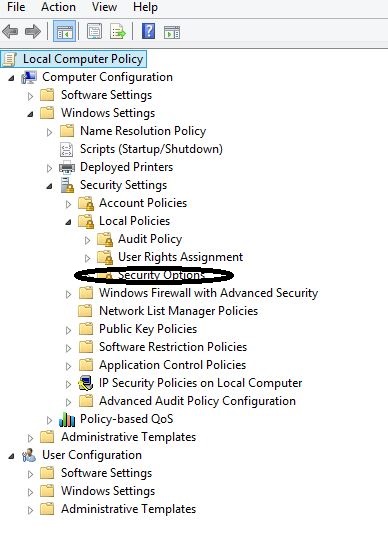
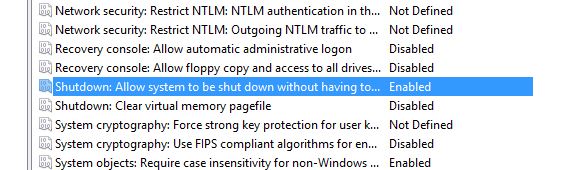
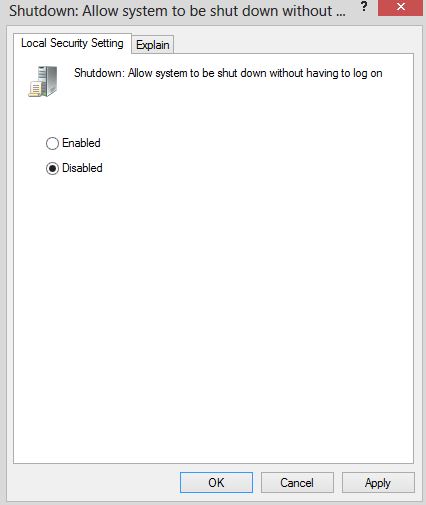
Cum scoatem butonul de shutdown din fereastra de login cu ajutorul gpedit Data 14/05/2015 Autor Cristian V Categorie Configurare Sistem de operare, OS - Windows, Stații de lucru 1 1577 Rezolvare problema (Fix IT) SituatieDorim sa dezactivam butonul de shutdown din fereastra de login Solutie Pasi de urmat Pentru a efectua acest lucru urmam acesti pasi: Accesam Start-Run si scriem gpedit.msc Accesam calea Computer Configuration -> Windows Settings -> Security Settings -> Local Policies -> Security Options In dreapta cautam optiunea “Shutdown: Allow system to be shut down without having to log on”. Aceasta optiune este setata ca Enable. Pentru a dezactiva Shutdown selectam disable Tip solutiePermanent Voteaza Up Down (16 din 31 persoane apreciaza acest articol) ShareTweetShare Despre Autor Cristian V Solutii Asemanatoare Shortcut close the current window of Google Chrome 1 Shortcut close the current tab in Google Chrome 1 Shortcut open a new tab and switch to it in Google Chrome 1 Shortcut open a new window in Google Chrome 1 How to install and configure AnduinOS 1 Garuda Linux guide -1 Leave A Comment? × Cancel Reply Save my name, email, and website in this browser for the next time I comment. eight − one =
Leave A Comment?