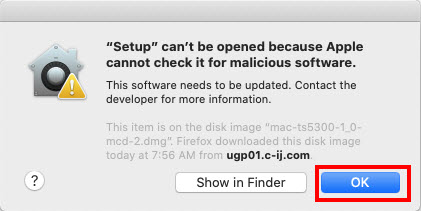
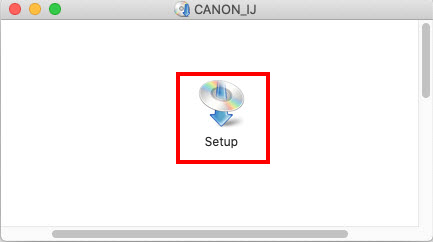
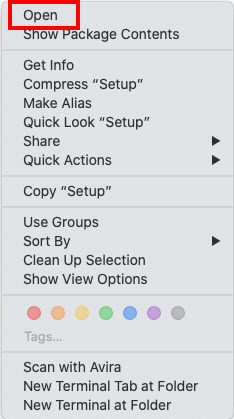
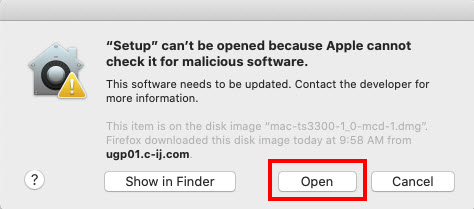
How to fix “Setup” can’t be opened because Apple cannot check it for malicious software on Mac OS Data 09/02/2024 Autor Ionut Pavel Categorie OS - Windows -7 386 Configurare noua (How To) Situatie Solutie Pasi de urmat Click OK Control Click (hold down the “Ctrl” key while clicking) the setup icon. Click Open Click Open. Tip solutiePermanent Etichetare: How to fix "Setup" can't be opened because Apple cannot check it for malicious software on Mac OS Voteaza Up Down (21 din 49 persoane apreciaza acest articol) ShareTweetShare Despre Autor Ionut Pavel Solutii Asemanatoare How to run Microsoft Defender full virus scan on Windows 11 1 Remediere Eroare: 0xc00000ba 2 How to install Manjaro 0 Raspberry Pi Music jukebox -1 6 Excel UI changes you need to make before starting your next spreadsheet 4 How to remap Copilot Key to launch Search in Windows 11 6 Leave A Comment? × Cancel Reply Save my name, email, and website in this browser for the next time I comment. − two = 4
Leave A Comment?
