
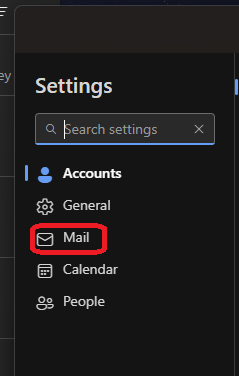
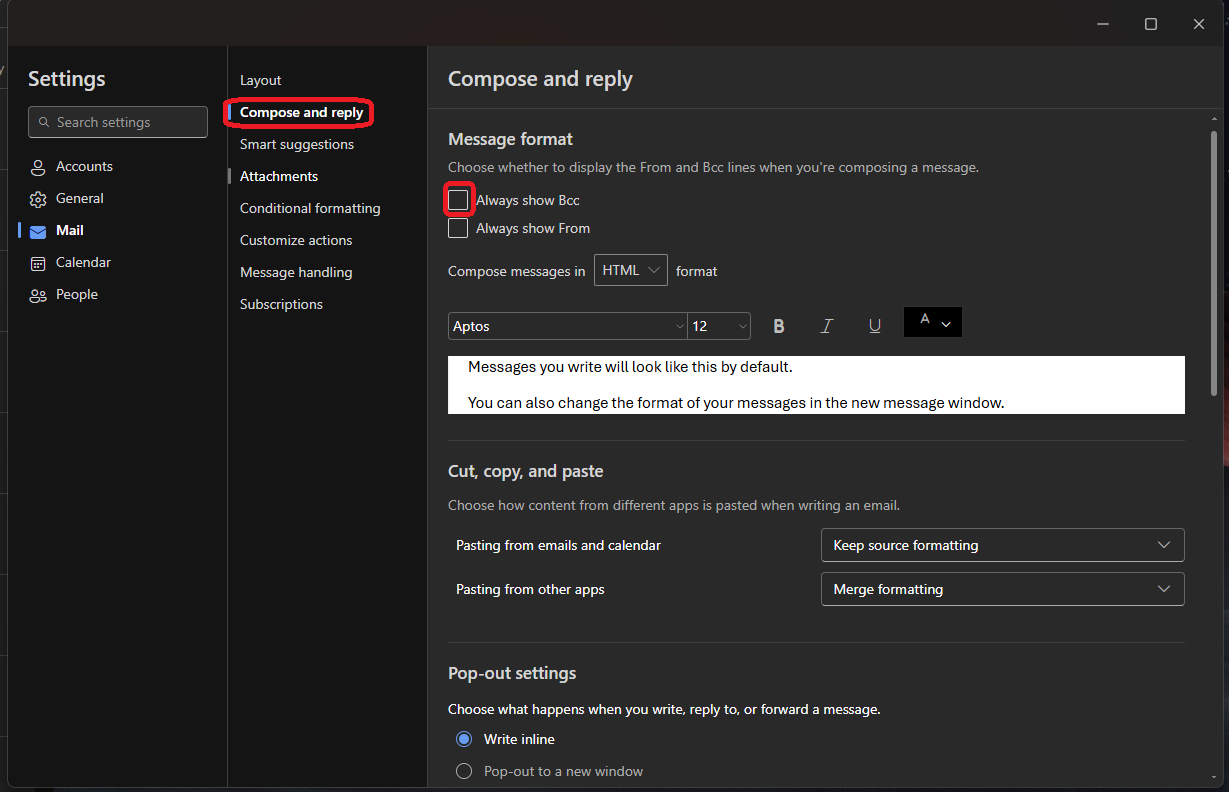
Cum activati optiunea “Always show Bcc” in Outlook New Data 18/03/2025 Autor preda silviu Categorie Soluții 2 330 Configurare noua (How To) Situatie Solutie Pasi de urmat Deschideti aplicatia Outlook New Deschideti meniul “Settings” Aici click pe “Mail” Selectati “Compose and reply” and activati functia “Always show Bcc”. Dupa activarea acestei optiuni de fiecare data cand veti crea un mail, acel camp va fi disponibil. Tip solutiePermanent Voteaza Up Down (13 din 24 persoane apreciaza acest articol) ShareTweetShare Despre Autor preda silviu Solutii Asemanatoare How to resolve a Windows Update Install Error – 0x80070002 3 How to move Taskbar to top or side on Windows 11 3 Reparare eroare:”Trust Relationship Failed” fără scoatere din domeniu și fără restart (PowerShell) 1 You’ve been deleting files the wrong way in Windows 5 Arduino Soil Moisture Sensor 5 Instalare și rulare model AI local (Llama3) pe server Linux folosind Ollama 3 Leave A Comment? × Cancel Reply Save my name, email, and website in this browser for the next time I comment. + 5 = thirteen


Leave A Comment?