
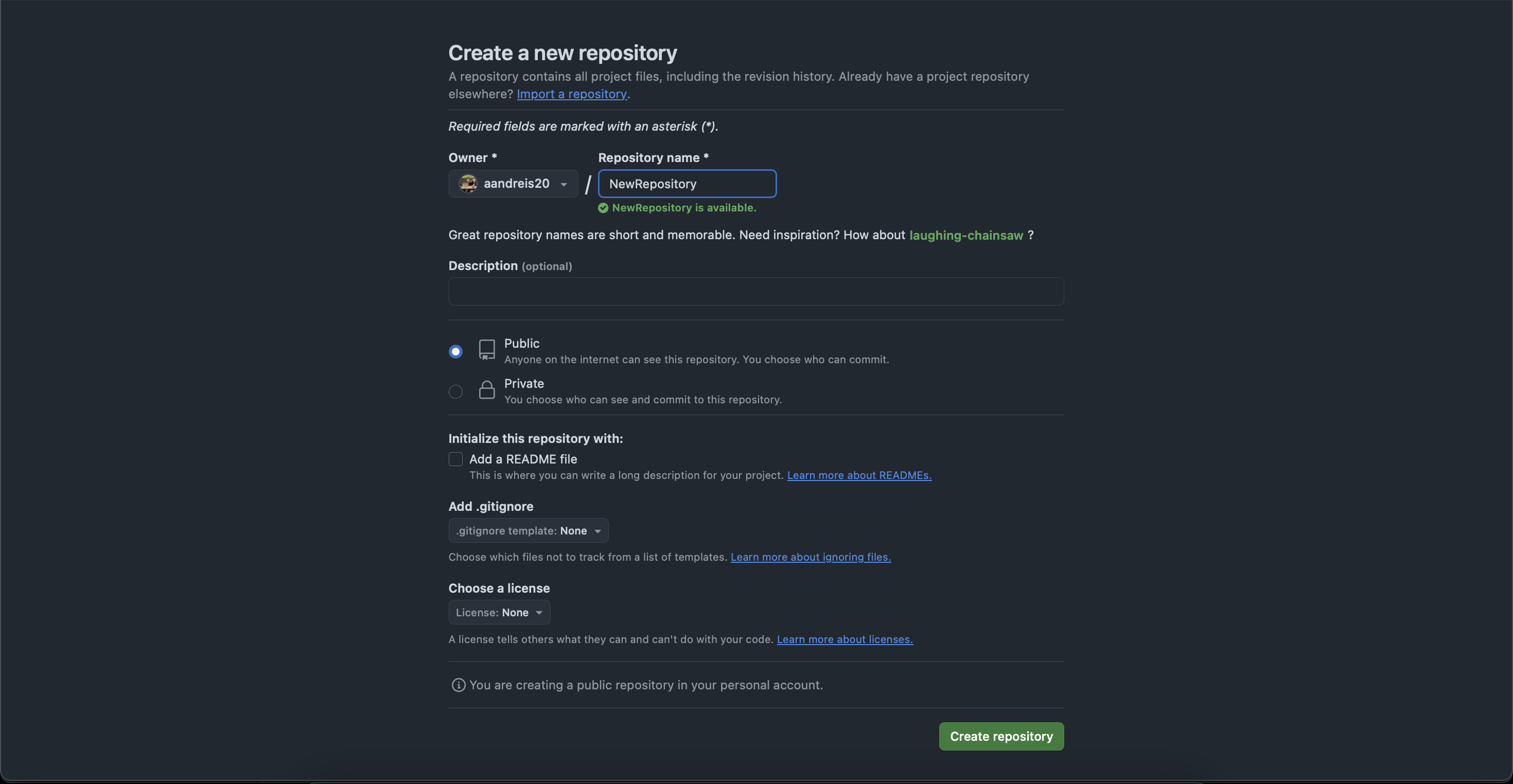
Cum se creează un nou repository pe github Data 22/05/2025 Autor Andrei Stanciu Categorie Soluții 0 231 Configurare noua (How To) Situatie Solutie Pasi de urmat Mergem la pagina profilului nostru si selectam tab-ul “Repositories” Apasam pe butonul de “New” Completam datele despre noul repository si apasam pe “Create repository” Repository-ul nostru a fost creat si il putem gasi in lista. Tip solutiePermanent Voteaza Up Down (8 din 17 persoane apreciaza acest articol) ShareTweetShare Despre Autor Andrei Stanciu Solutii Asemanatoare Windows 11 – previzualizarea fișierelor PDF nu funcționează în File Explorer 7 How to reset a Googlebook to factory settings 2 Tint App Icons to match your New iPhone 18 Pro Color 3 How to verify Windows 11 ISO file authenticity using PowerShell 6 Rezolvarea situatiei cand un laptop se blocheaza -5 Configurare gmail 2 Leave A Comment? × Cancel Reply Save my name, email, and website in this browser for the next time I comment. eight + = 10



Leave A Comment?