
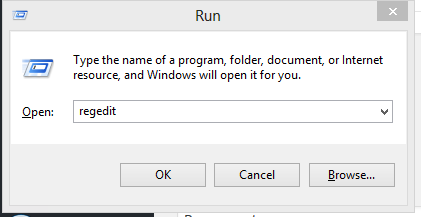
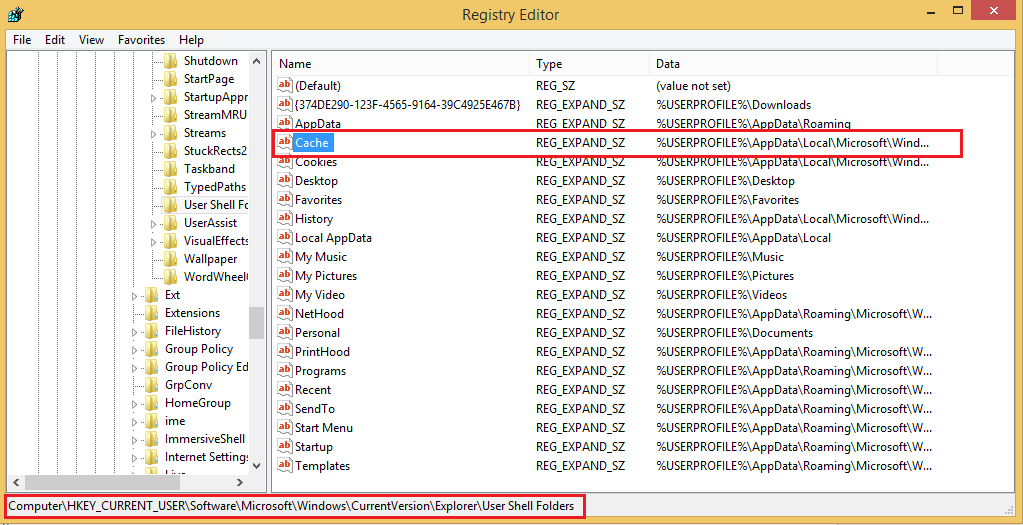
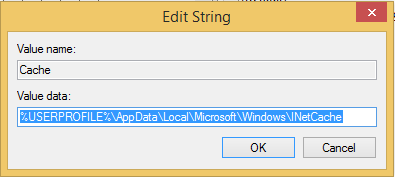
Schimbare locatie fisiere temporare internet explorer Data 13/04/2016 Autor Radu P Categorie OS - Windows, Personalizare sistem operare, Stații de lucru -8 2707 Configurare noua (How To) SituatieSe doreste schimbarea locatiei unde sunt stocate fisierele temporare ale internet explorer Solutie Pasi de urmat Se deschide regedit Se navigheaza la: HKEY_CURRENT_USERSoftwareMicrosoftWindowsCurrentVersionExplorerUser Shell Folders Se da dublu click pe Cache si la value se scrie locatia noua Tip solutiePermanent Voteaza Up Down (38 din 84 persoane apreciaza acest articol) ShareTweetShare Despre Autor Radu P Solutii Asemanatoare How to disable the Drag Tray feature on Windows 11 using the Registry Editor 3 How to disable share Drag Tray at the top of screen on Windows 11 2 5 scurtături din meniul contextual Windows care salveaza timp 1 Notificările pot fi oprite cu acest mic utilitar 2 Remedierea erorii:„Missing DLL File” în sistemele de operare Windows 5 Remedierea erorii:„Device not Migrated” în sistemele de operare Windows 6 Leave A Comment? × Cancel Reply Save my name, email, and website in this browser for the next time I comment. × 5 = fifteen
Leave A Comment?