
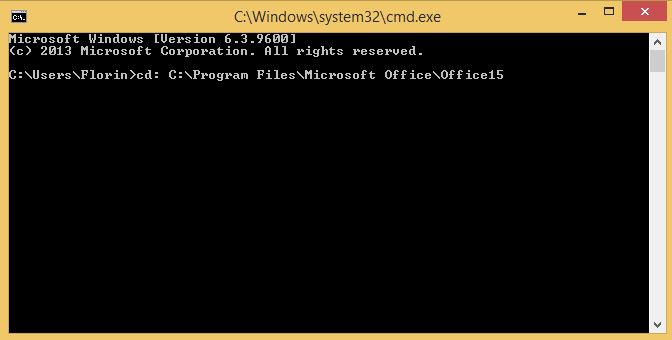
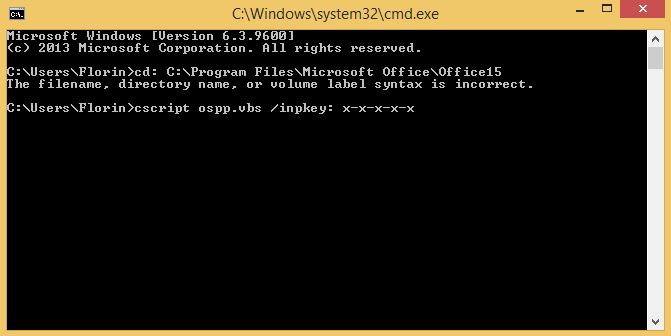
Activare office din command prompt folosind scriptul ospp.vbs Data 10/05/2016 Autor Florin Ghe Categorie OS - Windows, Aplicații -6 1323 Configurare noua (How To) SituatieSe doreste activarea din command prompt Solutie Pasi de urmat In command prompt se tasteaza urmatoarea comanda : cd: C:Program FilesMicrosoft OfficeOfficeX Unde X reprezinta varianta de Office instalata. Se tasteaza comanda : cscript ospp.vbs /inpkey: x-x-x-x-x Unde x-x-x-x-x reprezinta licenta. Tip solutiePermanent Voteaza Up Down (14 din 34 persoane apreciaza acest articol) ShareTweetShare Despre Autor Florin Ghe Solutii Asemanatoare How to use Winhance to debloat Windows 11 0 How to enable or Disable Font Smoothing in Windows 11 2 How to fix 0x800f0983 error on Windows 10/11 6 How to enable Windows 11 24H2 updates in WSUS 0 How to enable Windows 11 24H2 updates in SCCM 5 7 of the least-known Excel charts and why you should use them -2 Leave A Comment? × Cancel Reply Save my name, email, and website in this browser for the next time I comment. eight × 9 =
Leave A Comment?