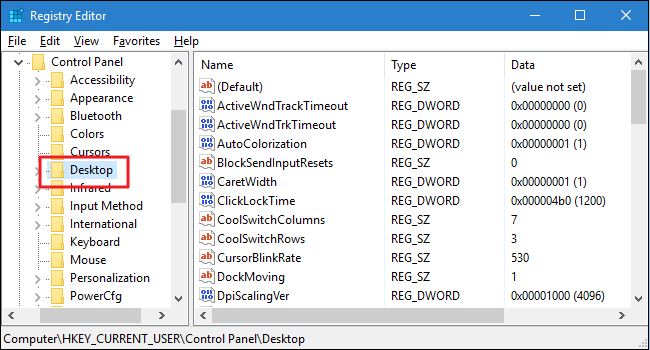
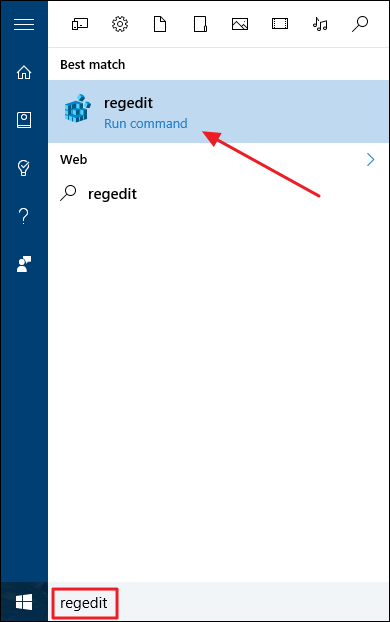
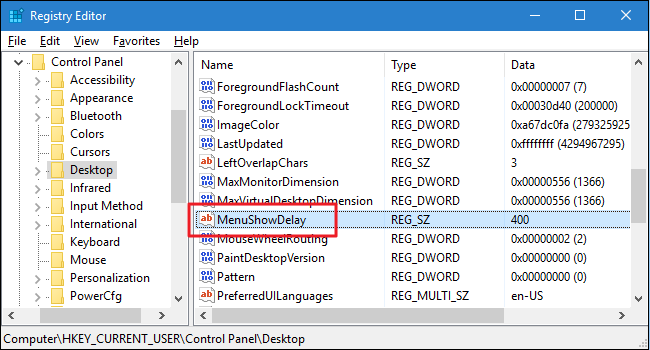
Cum sa schimbam viteza animatiilor in Windows 10 Data 12/05/2016 Autor Mihnea I Categorie OS - Windows, Stații de lucru, Configurare Sistem de operare -16 2935 Configurare noua (How To) SituatieVrem ca animatiile din Windows 10 se fie mai rapide (ex. meniul sa se deschida mai repede) Solutie Pasi de urmat Apasam pe butonul de “Start” si scriem “regedit”: In fereastra de registrii mergem in calea HKEY_CURRENT_USERControl PanelDesktop In partea dreapta vom cauta “MenuShowDelay” si dam dublu clic pe el: In urmatorul vom schimba valoarea 400 si punem 200: Tip solutiePermanent Voteaza Up Down (22 din 60 persoane apreciaza acest articol) ShareTweetShare Despre Autor Mihnea I Solutii Asemanatoare Bring your Windows Desktop to life with Wallpaper Engine 3 How to move Taskbar to top or side on Windows 11 2 Arduino Soil Moisture Sensor 6 Review Attack Shark X3Pro mouse 5 Review Attack Shark x85 keyboard 4 Arduino Fingerprint Sensor 4 Leave A Comment? × Cancel Reply Save my name, email, and website in this browser for the next time I comment. eight + three =
Leave A Comment?