
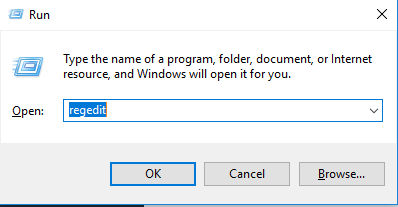
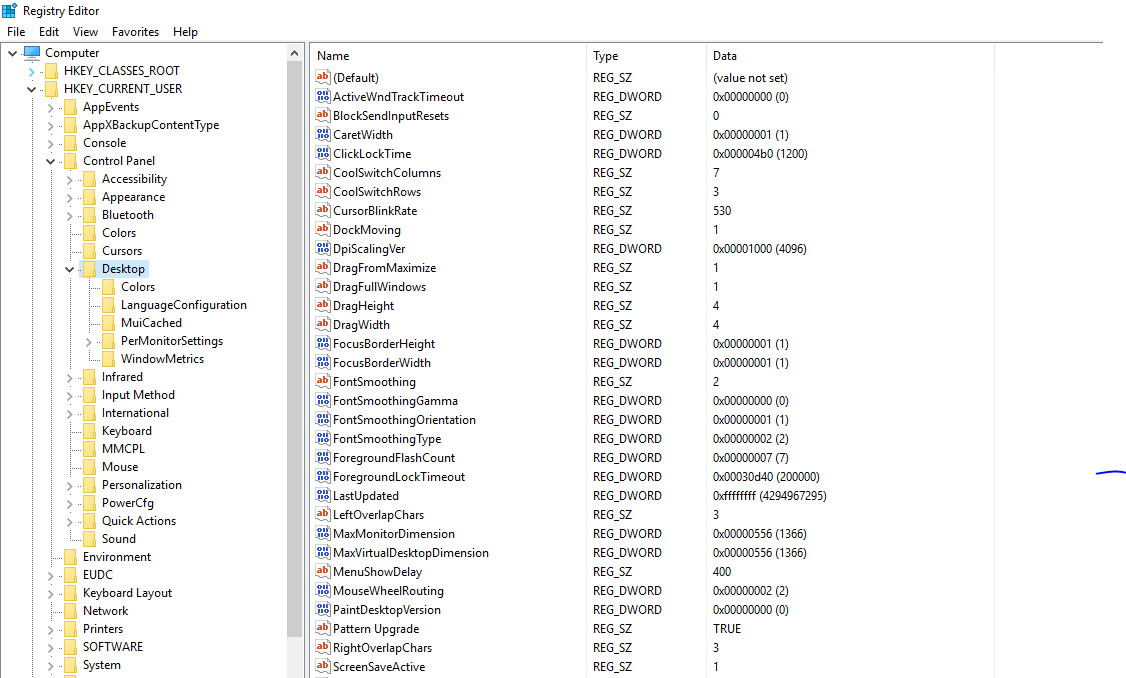
Dezactivarea mesajului This App is Preventing Shutdown or Restart Data 10/10/2016 Autor Cristian V Categorie OS - Windows -2 2165 Rezolvare problema (Fix IT) SituatieDorim dezactivarea acestui mesaj Solutie Pasi de urmat Apasam WIN+R si scrie regedit Navigam cheia HKEY_CURRENT_USERControl PanelDesktop In partea dreapta vom crea o cheia de tip string pe care o vom denumi AutoEndTasks si careia ii vom da valoarea 1 Restartam sistemul de operare Tip solutiePermanent Etichetare: askitaskit.roAutoEndTasksDezactivarea mesajului This App is Preventing Shutdown or RestartregeditrestartThis App is Preventing ShutdownWIN+R Voteaza Up Down (26 din 54 persoane apreciaza acest articol) ShareTweetShare Despre Autor Cristian V Solutii Asemanatoare Bring your Windows Desktop to life with Wallpaper Engine 7 How to move Taskbar to top or side on Windows 11 5 How to fix high CPU usage in Firefox / Chrome -1 How to fix Hypervisor Error in Windows 10/11 by Checking Drive for File System Errors 4 How to fix Hypervisor Error in Windows 10/11 by restarting Hyper-V Services 1 How to fix Hypervisor Error in Windows 10/11 by running Windows Memory Diagnostic Tool 2 Leave A Comment? × Cancel Reply Save my name, email, and website in this browser for the next time I comment. 1 × = six
Leave A Comment?