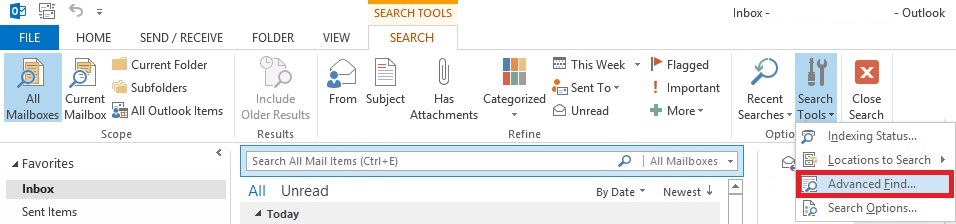
Unde se gaseste “Advanced Search” in Outlook 2013 Data 16/12/2014 Autor Vlad H Categorie E-mail, Aplicații -6 1617 Configurare noua (How To) SituatieSe doreste o cautare mai avansata a unui anumit mail. Solutie Pasi de urmat Se apasa butonul de Find (lupa) din dreptul casutei de “Search All Mail Items”. Se selecteaza butonul “Search Tools” Se apasa butonul “Advanced Find” Tip solutiePermanent Voteaza Up Down (35 din 76 persoane apreciaza acest articol) ShareTweetShare Despre Autor Vlad H Solutii Asemanatoare Cum dezinstalam eficient aplicatii in Windows 1 After installing Windows 11, the computer boots very slowly and some applications take a long time to open -2 Cum configuram valorile de luminozitate ale ecranului 1 Cum imbunatatim controlul asupra luminozitatii pe statia noastra 3 How to share files safely using OneDrive links -1 How to install OpenNMS on Ubuntu 24.04 -3 Leave A Comment? × Cancel Reply Save my name, email, and website in this browser for the next time I comment. × seven = seven
Leave A Comment?
