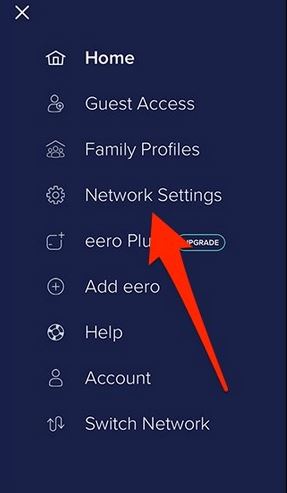
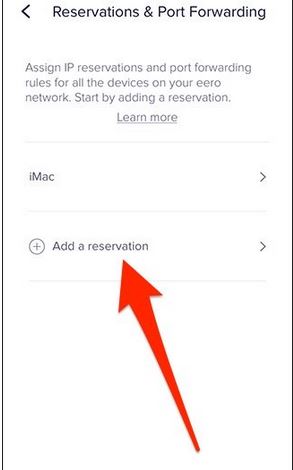
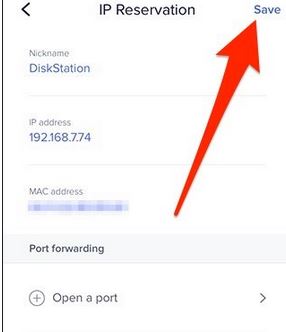
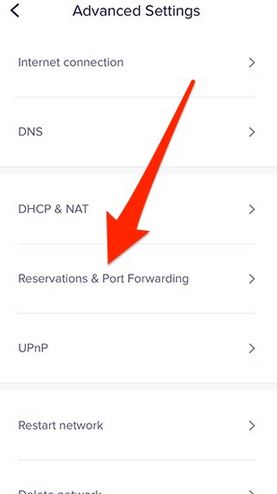
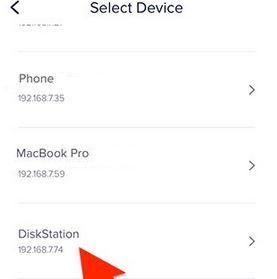
Cum sa setezi un ip static pe un router eero Data 04/04/2018 Autor Robert Ci. Categorie Aplicatii specifice -13 993 Configurare noua (How To) SituatieIn acest tutorial vom invata cum se poate seta un ip static pe un router eero Solutie Pasi de urmat Se acceseaza meniul principal si apoi network settings Se acceseaza meniul advanced settings si apoi meniul reservations & port forwarding Selectam dispozitivul dorit, adaugam ip ul si salvam setarile Tip solutiePermanent Etichetare: askitaskit.roCum sa setezi un ip static pe un router eeroeeroNetwork Settingsreservations & port forwarding Voteaza Up Down (27 din 67 persoane apreciaza acest articol) ShareTweetShare Despre Autor Robert Ci. Solutii Asemanatoare How to install and configure Gentoo Linux -1 How to create a Windows to go with Rufus to run Windows 11 from USB 0 Cum se instalează sistemul de gestionare a fotografiilor Lychee pe Debian 12 4 Google Assistant on Raspberry Pi 1 How I automatically back up my Home Assistant setup to the cloud without paying 4 Fix Windows 11 KB5062553 Update not installing 2 Leave A Comment? × Cancel Reply Save my name, email, and website in this browser for the next time I comment. four − = 2
Leave A Comment?