
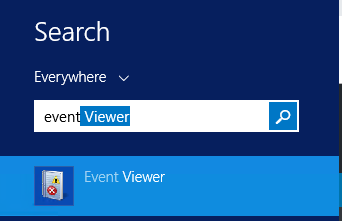
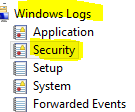
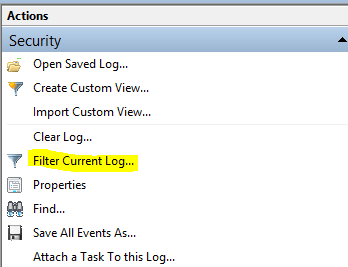
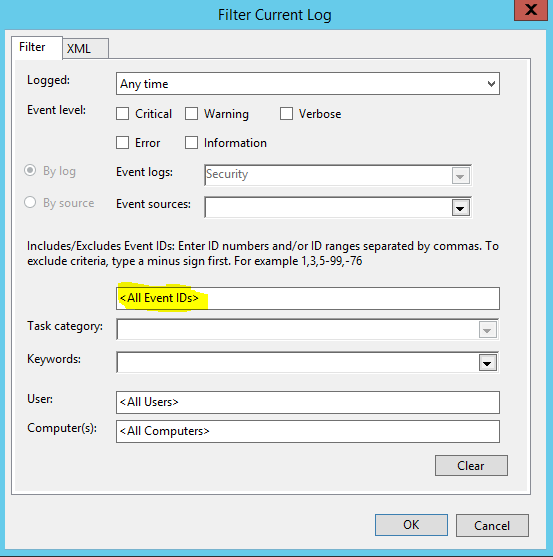
Cum verificam cine s-a logat pe AD Data 12/10/2018 Autor Cristian Anghel Categorie OS - Windows 1 835 Configurare noua (How To) SituatiePutem afla cine s-a logat pe AD urmand pasii de mai jos: Backup Nu este necesar Solutie Pasi de urmat Ne conectam pe serverul de AD. Se apasa pe start si scriem “event viewer”. . Accesam Windows Logs – Security. Accesam sectiunea de filtre : Filter Current Log. In campul <All Event IDs> trecem id-ul 4624. Apasam ok, si se vor afisa evenimentele de log on. Tip solutiePermanent Etichetare: Ad; log AD' verificare logare AD; Voteaza Up Down (28 din 55 persoane apreciaza acest articol) ShareTweetShare Despre Autor Cristian Anghel Solutii Asemanatoare How to disable every AI feature on Microsoft Edge for Windows 11 4 Cum rezolvam problema timpului din Windows cand apar decalaje de ora 4 Windows – verificarea și repararea fișierelor de sistem 1 Nu s-a putut crea dispozitivul de randare DX11 în Windows 11 3 How to fix Robotic sound on computer -1 Folosirea AI pentru reclame și automatizarea procesului pe Windows 11 -2 Leave A Comment? × Cancel Reply Save my name, email, and website in this browser for the next time I comment. eight − = 2
Leave A Comment?