
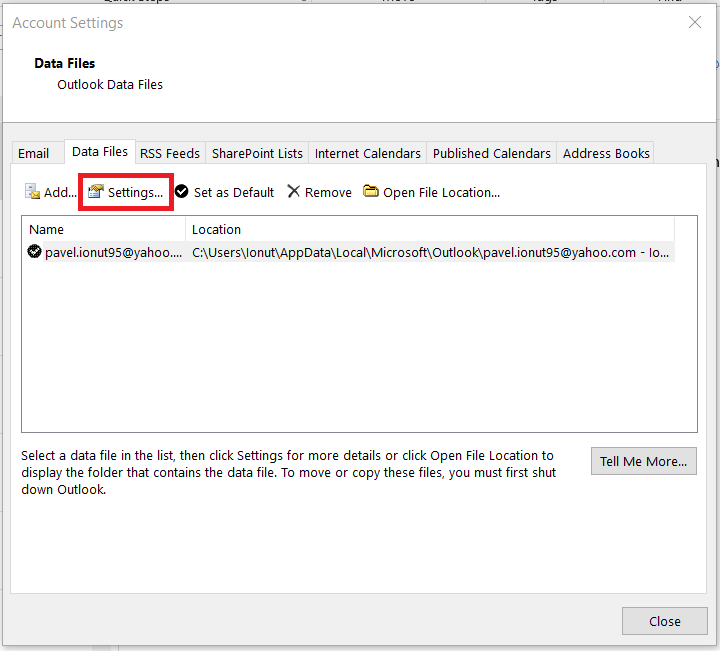
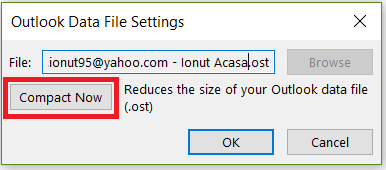
Rezolvare eroare Outlook “The Message Store has reached maximum size “ Data 09/11/2018 Autor Ionut Pavel Categorie OS - Windows -10 918 Configurare noua (How To) SituatieEroarea este intampinata atunci cand marimea copiei locale a email-ului a atins limita de 50 GB. Solutie Pasi de urmat Accesati Outlook>File>Account Settings In “Account Settings” selectati tab-ul “Data Files” si accesati setarile copiei locale. In “Outlook Data File Settings” selectati “Compact now”. Tip solutiePermanent Voteaza Up Down (17 din 44 persoane apreciaza acest articol) ShareTweetShare Despre Autor Ionut Pavel Solutii Asemanatoare Remediere Eroare: 0xc00000ba 3 Raspberry Pi Music jukebox 0 6 Excel UI changes you need to make before starting your next spreadsheet 3 How to remap Copilot Key to launch Search in Windows 11 4 How to enable Efficiency Mode on Windows 11 3 How to disable Efficiency Mode on Windows 11 2 Leave A Comment? × Cancel Reply Save my name, email, and website in this browser for the next time I comment. × eight = 56

Leave A Comment?