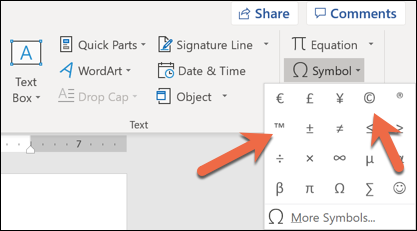
How to Insert a Copyright or Trademark Symbol in Word Data 15/12/2018 Autor stefan honciuc Categorie OS - Windows -7 1146 Configurare noua (How To) SituatieCum se adauga simbolurile de copyright si trademark in Word Solutie 1)Dam click pe tab-ul Insert 2)Click pe tab-ul Symbol 3)Alegem ce symbol dorim Tip solutiePermanent Voteaza Up Down (20 din 47 persoane apreciaza acest articol) ShareTweetShare Despre Autor stefan honciuc Solutii Asemanatoare Bring your Windows Desktop to life with Wallpaper Engine 1 How to move Taskbar to top or side on Windows 11 0 How to fix high CPU usage in Firefox / Chrome 1 How to fix Hypervisor Error in Windows 10/11 by Checking Drive for File System Errors 6 How to fix Hypervisor Error in Windows 10/11 by restarting Hyper-V Services 0 How to fix Hypervisor Error in Windows 10/11 by running Windows Memory Diagnostic Tool 1 Leave A Comment? × Cancel Reply Save my name, email, and website in this browser for the next time I comment. 1 × = 6
Leave A Comment?