
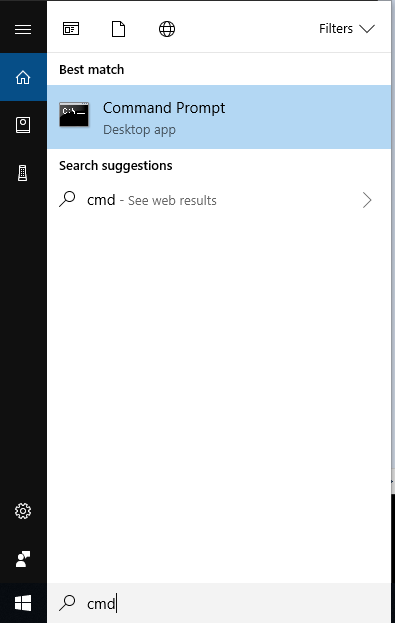
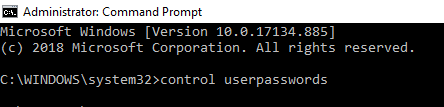
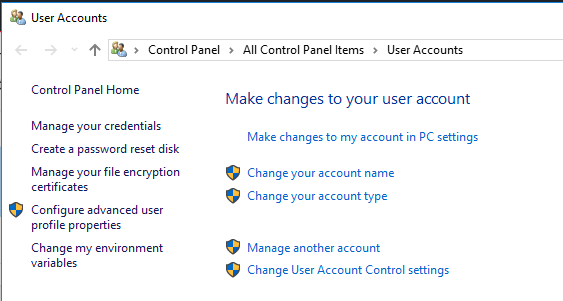
Cum sa accesezi User Accounts folosind CMD Data 11/07/2019 Autor alexandru corches Categorie Soluții 7 641 Configurare noua (How To) Situatie Solutie Pasi de urmat Accesam StartMenu, cautam cmd si ulterior il deschidem. Deschidem CMD si introducem urmatoarea linie de comanda: control userpasswords exemplu: Dupa introducerea comenzii, observam ca meniul pentru User Accounts se va deschide. Tip solutiePermanent Voteaza Up Down (20 din 33 persoane apreciaza acest articol) ShareTweetShare Despre Autor alexandru corches Solutii Asemanatoare How to disable the Drag Tray feature on Windows 11 using the Registry Editor 1 How to disable share Drag Tray at the top of screen on Windows 11 2 Cum raportezi emailurile de tip phishing în Outlook 2 Cum migrezi din OneDrive către SharePoint 2 Cum găsești și elimini fișiere duplicate în OneDrive 2 5 soluții eficiente pentru driverul video AMD care dă eroare la startup 1 Leave A Comment? × Cancel Reply Save my name, email, and website in this browser for the next time I comment. 9 + 6 =
Leave A Comment?