
File & Sharing

NAS 51 Solutii

Windows 251 Solutii

Samba 14 Solutii

How to rotate text in Google Docs

Google Docs has no official option to rotate text in your documents but you can use a workaround to do that. To start the process, launch a web browser on your computer and open Google Docs.

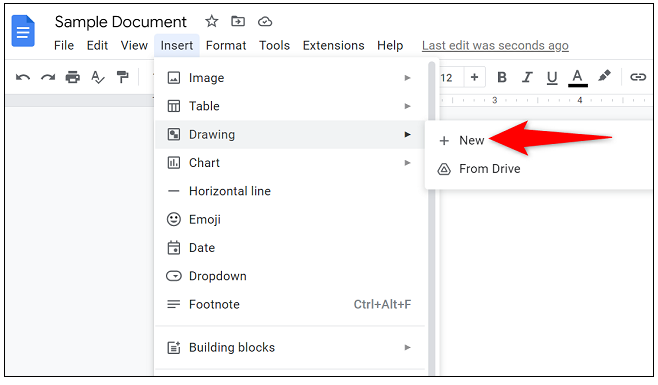
When your document launches, place the cursor where you want to add the rotated text. Then, from Google Docs menu bar, choose Insert -Drawing -New.
A Drawing window will launch. Here, in the toolbar items at the top, click the Text Box tool which is an icon of a box with a T in it.
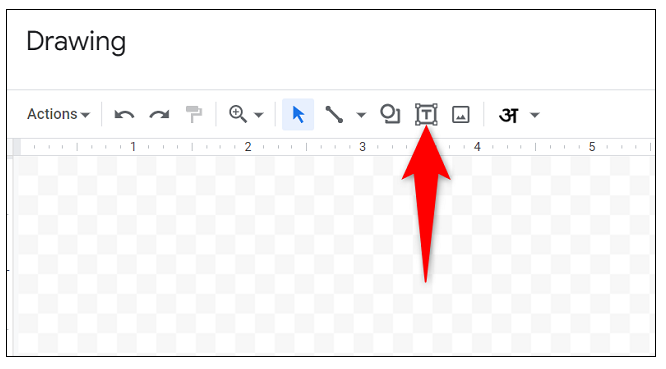
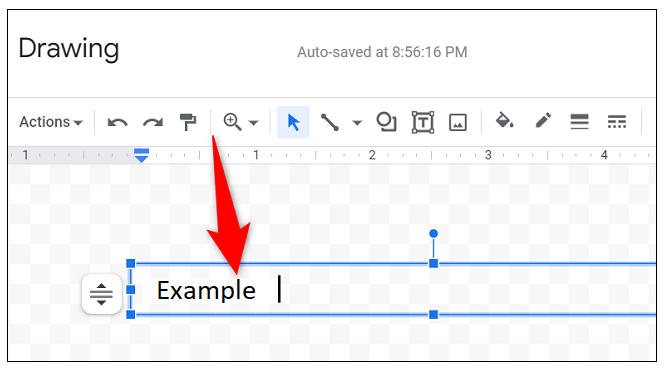
On the blank canvas, draw a text box. Then, click the box and add your text.
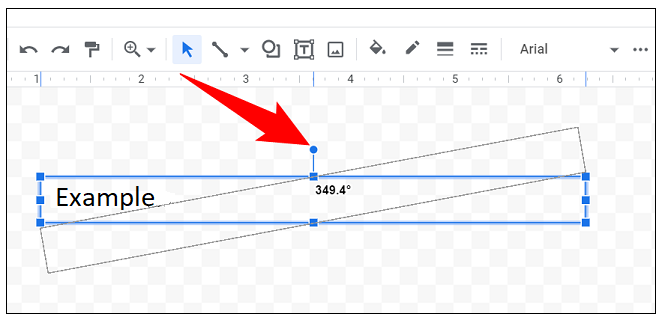
After entering the text, at the top of your text box, you’ll see a blue dot. Click and drag this dot to begin rotating your text box.
Add the text to your document by selecting Save and Close at the top-right corner of the Drawing window. On your document screen, you’ll find your rotated text.

[mai mult...]

Cum instalam GeekPanel pe Ubuntu 22.04

GeekPanel este un panou de control pentru gazduire web care va permite să vă gestionati serverele private virtuale printr-o interfata usor de utilizat. Puteti utiliza acest software pentru a crea si sterge site-uri web, pentru a instala si actualiza aplicatii de server si pentru a monitoriza utilizarea resurselor.

Are o serie de scripturi care pot simplifica procesul de instalare si intretinere a software-ului pe serverele dumneavoastra. Vine cu un program de instalare de script pentru aplicatii populare precum Drupal, Joomla, WordPress, Django și multe altele.

[mai mult...]

Cum instalam TinyCP pe Ubuntu 22.04

La fel ca software-ul de configurare a gazdei Webmin, TinyCP este un instrument excelent de utilizat atunci cand gestionati gazduirea web Linux. Este extrem de usor si include functii de gestionare pentru domenii, cutii postale, baze de date, FTP, Samba, firewall, VPN, GIT, SVN etc.

[mai mult...]