
Soluții

How to Manage Partitions on Windows Without Downloading Any Other Software

There are tons of third-party partition managers for Windows, but did you know that Windows includes its own? Microsoft did a good job of hiding the Disk Management tool, but it’s there. You can use the Disk Management tool to resize, create, delete and format partitions and volumes, as well as change their drive letters—all without downloading or paying for any other software.

[mai mult...]
Can You Connect Bluetooth Headphones to the Xbox Series X|S?

Gaming headsets deliver immersive audio while allowing you to use your voice to communicate with other players. Wireless headsets offer a degree of freedom that wired ones can’t match, but most require a dedicated USB dongle to ditch the cable.

  • Bluetooth Headsets Not Natively Supported

Microsoft made the decision not to support Bluetooth headsets in the Xbox Series X and S consoles. That means that you can’t natively connect your Bluetooth headset to your console or controller. You can still technically connect a Bluetooth headset to your controller’s 3.5mm stereo jack (which passes through audio) if you use a Bluetooth transmitter like the Uberwith Bluetooth Xbox One Transmitter.

Aftermarket Bluetooth transmitters are best avoided. They often introduce latency, which is disorientating in single-player games and could put you at a serious disadvantage in multiplayer.

[mai mult...]

Cum aflati capacitatea maxima RAM a unui laptop/desktop

Atunci când achiziționați un desktop sau un laptop nou este mai accesibil să alegeți mai întâi un model mai ieftin, iar mai târziu să faceți upgrade la memoria RAM pentru a atinge performanța maximă. Întrebarea este cât de multă memorie RAM poate suporta calculatorul dumneavoastră. Este deja la maxim sau mai este loc pentru upgrade?

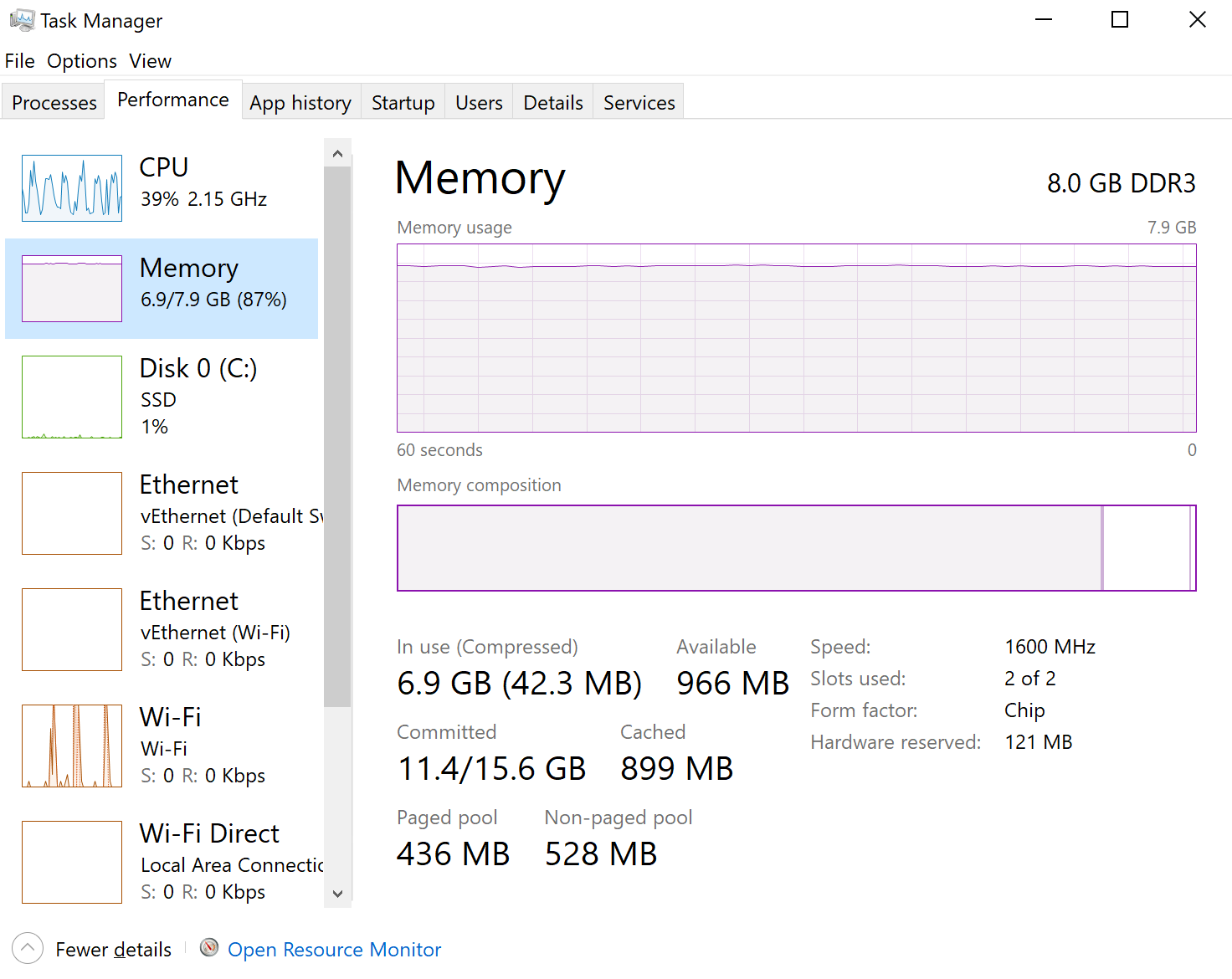
Pentru a afla câtă memorie RAM are în prezent computerul dvs. folositi combinatia de taste CTRL + SHIF + ESC pentru a deschide Task Manager. Din poza de mai jos putem observa ca laptopul are 8GB RAM si ambele sloturi sunt folosite ( slots used: 2 of 2).

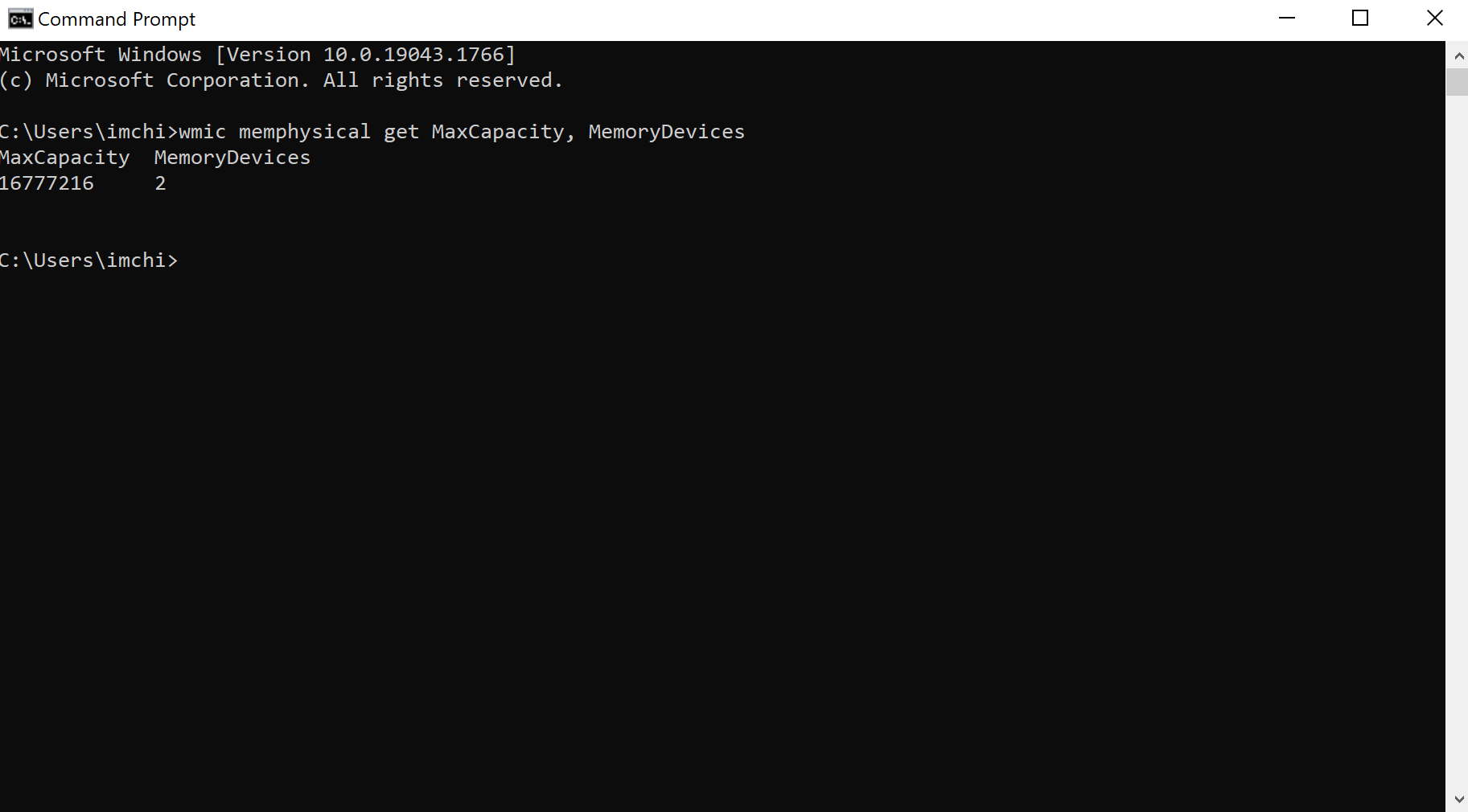
Din poza se poate vedea ca este nevoie sa marim capacitatea RAM (sunt folositi 6.9GB din totalul de 8GB). Pentru a afla ce capacitate RAM suporta sistemul nostru deschidem Comand prompt (linia de comanda) si introducem urmatoarea comanda:

wmic memphysical get MaxCapacity, MemoryDevices

Capacitatea este exprimata in KB (Kilobytes). Pentru a converti KB in GB se imparte numarul de KB la 1048576. Din poza de mai sus se poate observa ca laptopul are 2 sloturi si o capacitate maxima RAM de 16GB. Se pot instala 2 memorii RAM de 8GB fiecare.

[mai mult...]