
Soluții

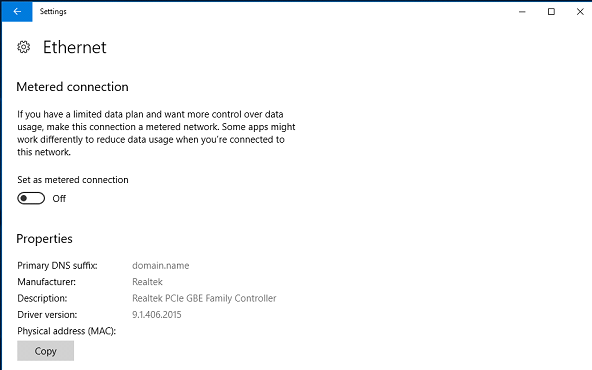
Cum dezactivezi meter connection

Pe computerul Windows 10, deschideți Setări > Rețea și Internet.
⦁ Faceți click pe Ethernet în partea stângă a ecranului.
⦁ Acum, faceți click pe numele conexiunii Ethernet.
⦁ În ecranul următor, veți găsi butonul de comutare Setare ca conexiune tarifată după utilizare.
[mai mult...]

How to Add to Windows PATH Environment Variable

By default, most of these programs will add their own custom shortcuts to the Windows environment variables. The most used environment variable in Windows is probably the PATH variable. It basically allows you to run any executables that are located inside the paths specified in the variable at the command prompt without having to give the full path to the executable.

[mai mult...]

How to Fix “not recognized as an internal or external command” in Windows

This is actually one of the most common errors you can face with the Command Prompt. As the error itself suggests, it couldn’t recognize the tool you were trying to use with the Command Prompt. There are various reasons why it happens, and also there are multiple ways to get around the “not recognized as an internal or external command” error on your Windows PC.

[mai mult...]

SQL EXISTS Operator

The SQL EXISTS Operator

The EXISTS operator is used to test for the existence of any record in a subquery.

The EXISTS operator returns TRUE if the subquery returns one or more records.

EXISTS Syntax
SELECT column_name(s)
FROM table_name
WHERE EXISTS
(SELECT column_name FROM table_name WHERE condition);
Demo Database

Below is a selection from the “Products” table in the Northwind sample database:

ProductID ProductName SupplierID CategoryID Unit Price
1 Chais 1 1 10 boxes x 20 bags 18
2 Chang 1 1 24 – 12 oz bottles 19
3 Aniseed Syrup 1 2 12 – 550 ml bottles 10
4 Chef Anton’s Cajun Seasoning 2 2 48 – 6 oz jars 22
5 Chef Anton’s Gumbo Mix 2 2 36 boxes 21.35

And a selection from the “Suppliers” table:

SupplierID SupplierName ContactName Address City PostalCode Country
1 Exotic Liquid Charlotte Cooper 49 Gilbert St. London EC1 4SD UK
2 New Orleans Cajun Delights Shelley Burke P.O. Box 78934 New Orleans 70117 USA
3 Grandma Kelly’s Homestead Regina Murphy 707 Oxford Rd. Ann Arbor 48104 USA
4 Tokyo Traders Yoshi Nagase 9-8 Sekimai Musashino-shi Tokyo 100 Japan
[mai mult...]

SQL HAVING Clause

The SQL HAVING Clause

The HAVING clause was added to SQL because the WHERE keyword cannot be used with aggregate functions.

HAVING Syntax
SELECT column_name(s)
FROM table_name
WHERE condition
GROUP BY column_name(s)
HAVING condition
ORDER BY column_name(s);
Demo Database

Below is a selection from the “Customers” table in the Northwind sample database:

CustomerID CustomerName ContactName Address City PostalCode Country
1 Alfreds Futterkiste Maria Anders Obere Str. 57 Berlin 12209 Germany
2 Ana Trujillo Emparedados y helados Ana Trujillo Avda. de la Constitución 2222 México D.F. 05021 Mexico
3 Antonio Moreno Taquería Antonio Moreno Mataderos 2312 México D.F. 05023 Mexico
4 Around the Horn Thomas Hardy 120 Hanover Sq. London WA1 1DP UK
5 Berglunds snabbköp Christina Berglund Berguvsvägen 8 Luleå S-958 22 Sweden

SQL HAVING Examples

The following SQL statement lists the number of customers in each country. Only include countries with more than 5 customers:

Example
SELECT COUNT(CustomerID), Country
FROM Customers
GROUP BY Country
HAVING COUNT(CustomerID) > 5;

The following SQL statement lists the number of customers in each country, sorted high to low (Only include countries with more than 5 customers):

Example
SELECT COUNT(CustomerID), Country
FROM Customers
GROUP BY Country
HAVING COUNT(CustomerID) > 5
ORDER BY COUNT(CustomerID) DESC;
The following SQL statement lists the number of customers in each country, sorted high to low (Only include countries with more than 5 customers):
[mai mult...]