Soluții

Hide ribbon in Microsoft Office

Ribbon-ul este este un set de toolbars care sunt afisate in partea de sus a ferestrei si sunt concepute pentru a ne ajuta sa gasim rapid comenzile de care avem nevoie pentru a finaliza un anumit task.

Daca avem nevoie de mai mult spatiu pe ecran, il putem ascunde temporar. Putem face asta in 3 moduri.

[mai mult...]
How to update from RHEL 8.3 to 8.4

Let us see what’s new in RHEL 8.4 and how to update 8.3 to 8.4 using the dnf command-line option.

RHEL 8.4 released

From the RedHat Enterprise Linux version 8.4 product page:

  • Hybrid cloud your way: RHEL 8.4 enables the innovation and transformation required to get to the cloud, the edge and beyond.
  • RHEL at the Edge
  • Red Hat Insights: Expanded capabilities in the Red Hat Insights services — Vulnerability, Compliance, Resource Optimization, and Subscriptions — help organizations to more efficiently and effectively manage their RHEL estates across the open hybrid cloud, including deployments in the public cloud.

New software and feature in RHEL 8.4:

  1. Python 3.9
  2. Redis 6
  3. PostgreSQL 13
  4. MariaDB 10.5
  5. GCC 10
  6. LLVM 11
  7. Rust 1.49
  8. Go 1.15.7
  9. Intel Tiger Lake GPUs are now supported which includes Intel UHD graphics and Intel Xe integrated GPUs.

WARNING: Make sure you keep verified RHEL 8.x backups before performing minor or significant RHEL version upgrades.

How to update RHEL 8.3 to 8.4

The procedure to upgrade or update RHEL from version 8.3 to 8.4 is as follows:

  1. Open the terminal application and then type the following commands. Another option is to log in using ssh
  2. Login as the root user. For example: ssh ec2-user@rhel-8-ec2-box
  3. Check for updates using the sudo dnf check-update command
  4. Update the system using the sudo dnf update command
  5. Reboot the server/box using the sudo reboot command
  6. Verify new kernel and updates

Another option is to deploy updated images and get rid of older instances. Let us see all commands and steps in details.

Step 1 – Note down the current kernel version

Type the following uname command or cat command to view RHEL kernel version and OS info:
$ uname -a
$ uname -r
$ cat /etc/os-release

Step 2 – Backups

Make a backup – it cannot be stressed enough how important it is to backup your system before you do this.

Step 3 – Check for updates using dnf

Type the following dnf command:
$ sudo dnf check-update

Step 4 – Upgrading RHEL 8.3 to 8.4

Type the following dnf command to apply/install updates:
$ sudo dnf upgrade -y

================================================================================
 Package          Arch   Version         Repository                        Size
================================================================================
Installing:
 kernel-core      x86_64 4.18.0-305.el8  rhel-8-for-x86_64-baseos-rpms     36 M
 kernel-modules   x86_64 4.18.0-305.el8  rhel-8-for-x86_64-baseos-rpms     28 M
Upgrading:
 NetworkManager   x86_64 1:1.30.0-7.el8  rhel-8-for-x86_64-baseos-rpms    2.6 M
 NetworkManager-libnm
                  x86_64 1:1.30.0-7.el8  rhel-8-for-x86_64-baseos-rpms    1.8 M
 NetworkManager-team
                  x86_64 1:1.30.0-7.el8  rhel-8-for-x86_64-baseos-rpms    145 k
 NetworkManager-tui
                  x86_64 1:1.30.0-7.el8  rhel-8-for-x86_64-baseos-rpms    327 k
.....
..
.....
rdma-core        x86_64 32.0-4.el8      rhel-8-for-x86_64-baseos-rpms     59 k
 tpm2-tss         x86_64 2.3.2-3.el8     rhel-8-for-x86_64-baseos-rpms    275 k
 volume_key-libs  x86_64 0.3.11-5.el8    rhel-8-for-x86_64-appstream-rpms 149 k
Installing weak dependencies:
 udisks2          x86_64 2.9.0-6.el8     rhel-8-for-x86_64-appstream-rpms 474 k
Removing:
 kernel-core      x86_64 4.18.0-240.10.1.el8_3
                                         @rhel-8-for-x86_64-baseos-rpms    62 M
 kernel-modules   x86_64 4.18.0-240.10.1.el8_3
                                         @rhel-8-for-x86_64-baseos-rpms    21 M
 
Transaction Summary
================================================================================
Install   38 Packages
Upgrade  210 Packages
Remove     2 Packages
Step 5 – Reboot the RHEL 8.3 box

Type the following reboot command or shutdown command to reboot Linux system:
$ sudo reboot
## OR ##
$ sudo shutdown -r now

Step 6 – Verify the RHEL 8.4 update

Type the following commands:
$ uname -a
$ uname -r
$ cat /etc/os-release
$ tail -f /var/log/logfilenames
$ dmesg | grep -i 'err|warn|cri'
$ ss -tulpn

Sample session from version 8.4:

RHEL 8.4 released and my box updated to 8.4 from 8.3 using dnf

[mai mult...]

Microsoft Word – adaugarea comenzilor Insert Rows Above&Below in Quick Access Toolbar

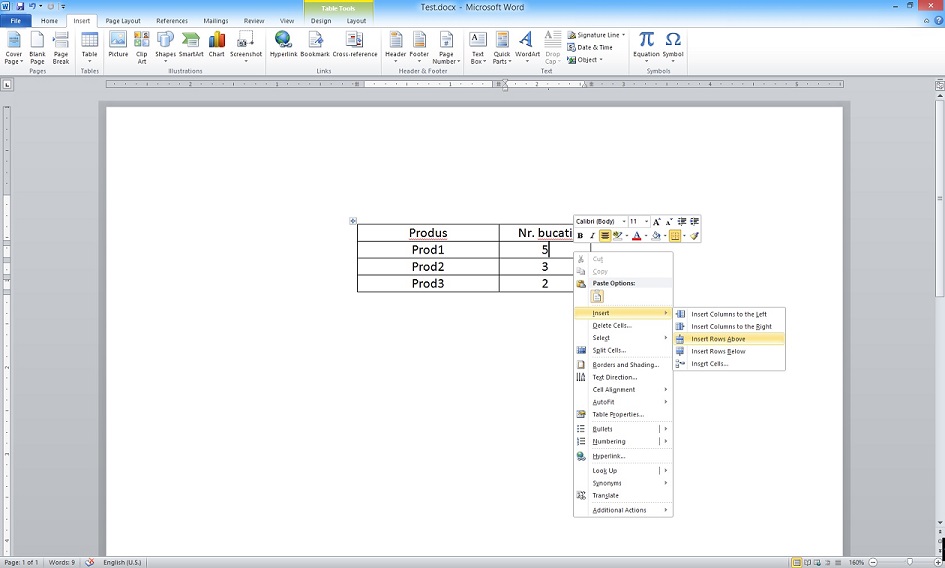
Implicit comenzile Insert Rows Above&Below nu exista in Quick Access Toolbar. Pentru a le accesa fara a avea acest shortcut-uri trebuie sa facem click dreapta intr-un rand din tabel si sa selectam comanda Insert – Insert rows.

Daca lucrati foarte mult cu tabele in Word adaugarea unui shortcut pentru a insera un nou rand va poate ajuta sa castigati timp. Vom exemplifica in Word 2010.

[mai mult...]

Unitatea USB continua sa se deconecteze și sa se reconecteze pe Windows 10

Uneori, cand va conectati un stick USB la computer, portul USB continua sa se deconecteze și sa se reconecteze la fiecare cateva secunde sau uneori minute. Fapt care duce la situatia in care daca avem nevoie sa transferam fisiere pe stick-ul de memorie usb sau invers, vom intampina mari probleme.

  • Ce trebuie sa facem daca unitatea USB continua sa se deconecteze și sa se reconecteze pe Windows 10?

[mai mult...]