How to Make a Curved Graph in Excel


Soluții pentru problemele tale IT

Dacă folosiți foldere de rețea mapate, probabil ca v-ați întâlnit cu situația în care v-a fost trimisă o cale ce conține numele drive-ului mapat, spre exemplu “Z:\Nume Folder”, pe care nu il puteți accesa, primind mesajul că nu găsește calea respectivă.
Pentru a evita aceasta problema, trebuie sa trimiteți calea reală către resursa respectivă, iar pentru a o afla, puteți folosi una dintre metodele enumerate mai jos.
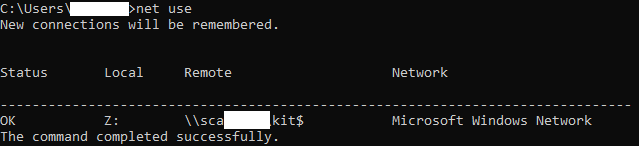
1. Deschideți comand prompt, prin apăsarea combinației de taste Windows key+R, si tastați cmd. Apoi, tastați comanda net use, care vă va afișa calea completă către toate locațiile mapate. Dacă folosiți aceasta metodă, trebuie sa completați manual calea pentru a ajunge la fișierul/folderul dorit.
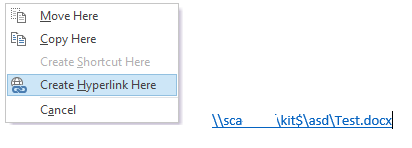
2.Dacă folosiți Microsoft Outlook, deschideți o fereastră pentru crearea unui mail nou, țineți click dreapta apăsat pe share-ul respectiv și trageți către fereastra din Outlook deschisa anterior. Va apărea un meniu, din care selectați opțiunea Create Hyperlink Here. Aceasta metodă vă va afișa cu succes calea completă către fișierul/folderul dorit.
[mai mult...]
If you’re working with large excel files, or with ones that use Macros, you might have ran across this issue, where the program crashes after opening those files.
Usually, in order to start troubleshooting these issues,you should check Microsoft Event Viewer for logs reffering to that application.The most common event I’ve run into is Event 1000, reffering to VBE7.dll.
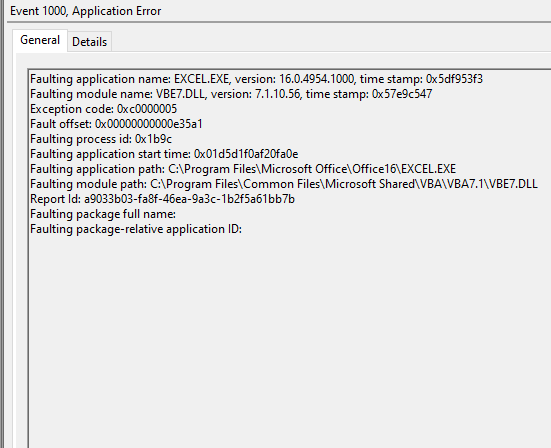
To fix this problem, you must have administrator rights on that device, since you need modify the registry.
First,press Windows Key+R and type regedit in order to open the Registry Editor.
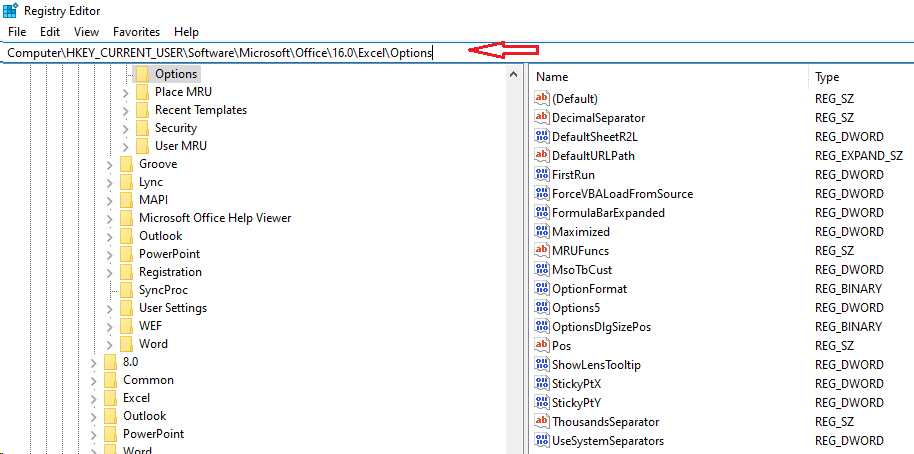
Copy the following path Computer\HKEY_CURRENT_USER\Software\Microsoft\VBA\7.1\Common in the address field at the top of the editor window and create a new DWORD entry(for me it worked with 32 bit entry, while using a 64 bit Office) named CompileOnDemand with the 0 value.Now go to Computer\HKEY_CURRENT_USER\Software\Microsoft\Office\16.0\Excel\Options and add another DWORD entry ForceVBALoadFromSource with the value 1.
[mai mult...]

Noul browser Microsoft Edge, bazat pe proiectul Chromium utilizat de Google Chrome, aduce o experiență de navigare mai bună pe computerele Windows 10. O caracteristică unică este posibilitatea de a utiliza extensii atât din Microsoft cât și din Chrome Web Store. Iată cum să le instalați și să le utilizați.
Va trebui să descărcați noul browser Microsoft Edge și să îl instalați înainte de a începe.
[mai mult...]Va propun un script PowerShell pentru instalarea remote a unei imprimante pe mai multe statii aflate in acelasi domeniu. Imprimanta poate sa fie o imprimanta locala, caz in care se folosesc porturile LPT sau USB sau o imprimanta de retea, caz in care se va folosi adresa IP a imprimantei pentru instalare.
[mai mult...]NFC has long been held back by Apple not supporting it—only Android did. Now that both major smartphone platforms will soon support NFC, the technology can reach its full potential. From keyless locks to digital IDs, the future is here.

Apple Pay has always used NFC for contactless payments. If you’ve ever paid for something using your iPhone or Apple Watch, you’ve used NFC.
NFC stands for Near Field Communications, and it’s a set of standards that allow devices to communicate through radio waves when they’re in close proximity. Emphasis on the close, as the devices need to be 4 inches apart or less.
With NFC, you can accomplish a variety of tasks, whether it be sharing data, mobile payments, or tag reading and writing.
NFC isn’t a new technology by any means, but comprehensive support is something we’ve never seen. Android phones have longed enjoyed full NFC support, along with Blackberrys and Windows Phone. But adopting NFC doesn’t guarantee the success of a mobile platform.
But for all the mobile devices that do have NFC, one significant outlier existed: iPhones. While the Android phone with NFC hardware (the Nexus S) released in 2010, it took until 2014 to see an iPhone with NFC hardware (the iPhone 6). And in the beginning, it was locked down to solely payment processing.
That’s been changing over time, and with iOS 13, an iPhone going back to the iPhone 7 will have its NFC potential unlocked. App developers can read and write to NFC tags, read chipped passports and ID cards, unlock NFC-enabled doors, and more.
Use Your iPhone to Unlock Doors
One of the promises of NFC is added convenience to your life. With expanded support in iOS 13, you could not only leave your wallet at home but maybe even your house keys, too.
Some hotels, like Starwood, already have a similar function that relies on Bluetooth and your phone or Apple Watch to unlock your room, but the technology could just as easily use NFC instead (and does in many hotels). More and more business are using NFC cards to grant to access to offices or even protected areas of a workplace. Instead of remembering to attach your badge to your belt with a badge reel, pull out your phone and wave it over the sensor.
You can unlock some smart locks with NFC as well. If you installed an NFC lock in your home, you can forget about one more key you used to carry everywhere. Some apartment complexes are making a move to NFC key fobs as well, and if you have the option, carrying around just a phone will be more convenient.

With iOS 13, iPhones will be able to scan NFC chipped IDs and store their details. With appropriate apps, you could then save a digital copy of your ID on your iPhone and pull it up when needed.
If you’ve ever used the Wallet app on iPhone, you’ll know why this is powerful and something to get excited over. Currently, you can digitize credit cards, debit cards, and even some rewards cards and store them in the Wallet app. But you still needed to carry your wallet or purse anyways, because you needed your ID. At that point, why not bring the physical cards and use them too?
But if you can store even your ID on a smartphone, then you can leave the wallet safe at home and have that less to carry.
We’ll have to wait on ID cards to catch up and support both NFC chips and digitization, but companies like RealID are already working on supporting iOS 13 with its passport digitization service.
But E.U residents of Great Britain will benefit even sooner with the release of iOS 13. The U.K. government created an EU Exit app that lets residents scan their passports and apply for to say in the U.K. after Brexit completes. But Apple didn’t support using NFC to scan the passport before. The only option was to Android, even if that meant borrowing a friend’s as the U.K. suggested. Now, Apple will support the feature, and an iOS EU Exit app is in the works.

Right now, if you want to rent a scooter or bike from Lime or Bird, you first have to download an associated app. That’s not always feasible if you have low data caps, or the app exceeds the cellular download limit. A company can choose to support Apple Pay instead, but that requires a payment terminal, like that tap and pay credit card machines you see in stores.
With iOS 13, companies can strategically place NFC stickers (for instance, on the scooter) and use those to arrange payment instead of download an app. The process should be faster overall since you won’t need to set up an account or wait for an app install. The change should benefit companies, too, as the ability to forgo an app download will likely spur impulse buys. The more barriers a company can remove, the more likely you’ll give a new service a try, even if just once.
Transport stations have been slowly switching to contactless methods for payment and check-in. Combined with Apple pay, you can easily pay for your rides ahead of time and scan through any check areas as needed. You can already do this in New York, Portland, Japan, Beijing, and Shanghai.
Combined with the upcoming digital ID and door unlock capabilities above, you could leave home, get on the subway, and unlock your office without the need for a wallet or keys. If the subway is too busy, catching a cab or renting a scooter with just an app, or soon the NFC tags above, is getting easier every day.

Siri Shortcuts let you automate sequences of actions, like dimming the screen and setting do not disturb, or texting three friends you are home after a long trip.
While convenient, you either have to speak to your iPhone or triggering it from an app. In iOS 13, you can create shortcuts that trigger when you tap your phone to an NFC tag.
Imagine for a moment you had two tags in your car. You could set one tag to open your preferred maps app, so you don’t have to hunt for it in your folders. The other tag could also open the maps app and insert your home address. While these ideas sound minor, they’re convenient, especially if you’re exhausted after a long day of travel.
You could also stick an NFC tag to your laptop that triggers your iPhone to turn on hotspot when tapped, thus skipping the hassle of digging through to the hotspot settings.
These scenarios aren’t just theory; we’ve used NFC tags and Android phone to accomplish the same goals.

Other platforms like Android and Windows Phone have long championed NFC and its capabilities, and we can look to them for other potential features. Windows Phones used NFC to pair and share contact info and other data like photos. Rather than go through a complicated process of connecting via Bluetooth across two phones, you selected a photo or photos and then chose to send via NFC. Once you tapped the phones together, they paired and took care of the rest. Android has similar sharing capabilities called Android Beam that used NFC.
That same capability extends to business cards. Instead of carrying around dozens of business cards, you could create a digital card with your contact info and share it via NFC. It’s a dual-sided benefit, not only do you have less to carry (and buy) but you’ll know your contact details went into somebody’s phone and not the trash. Likewise, you can store tickets for events on your phone and use them via NFC; the venue would just need an NFC reader.
NFC can make Wi-Fi sharing less of a pain as well. By saving the relevant details to an NFC tag, your guests can connect to your network by just tapping it. No need to muddle through several SSID names, or write down your password. Any place that offers public Wi-Fi, like Hotels and restaurants, could also share Wi-Fi details on an NFC tag in central locations.
Some password managers, like Dashlane, let you add credit card info by tapping the card’s NFC chip (if it has one) to your phone. The information is pulled and stored securely in the password manager to make payment processing all the faster. The feature is Android only right now, but with iOS 13 that can change.
In some ways, what iPhone is doing now is something other platforms have tried to do for ages. But this is likely a case where everybody wins. Without all the major platforms on board, governments and companies lacked the incentive to embrace NFC fully. Much like Apple finally including QI wireless charging in its phone helped the wireless charging market reach a new level everyone can appreciate, adding more support for NFC may push it to a point where everybody embraces it, and so everyone wins.
[mai mult...]