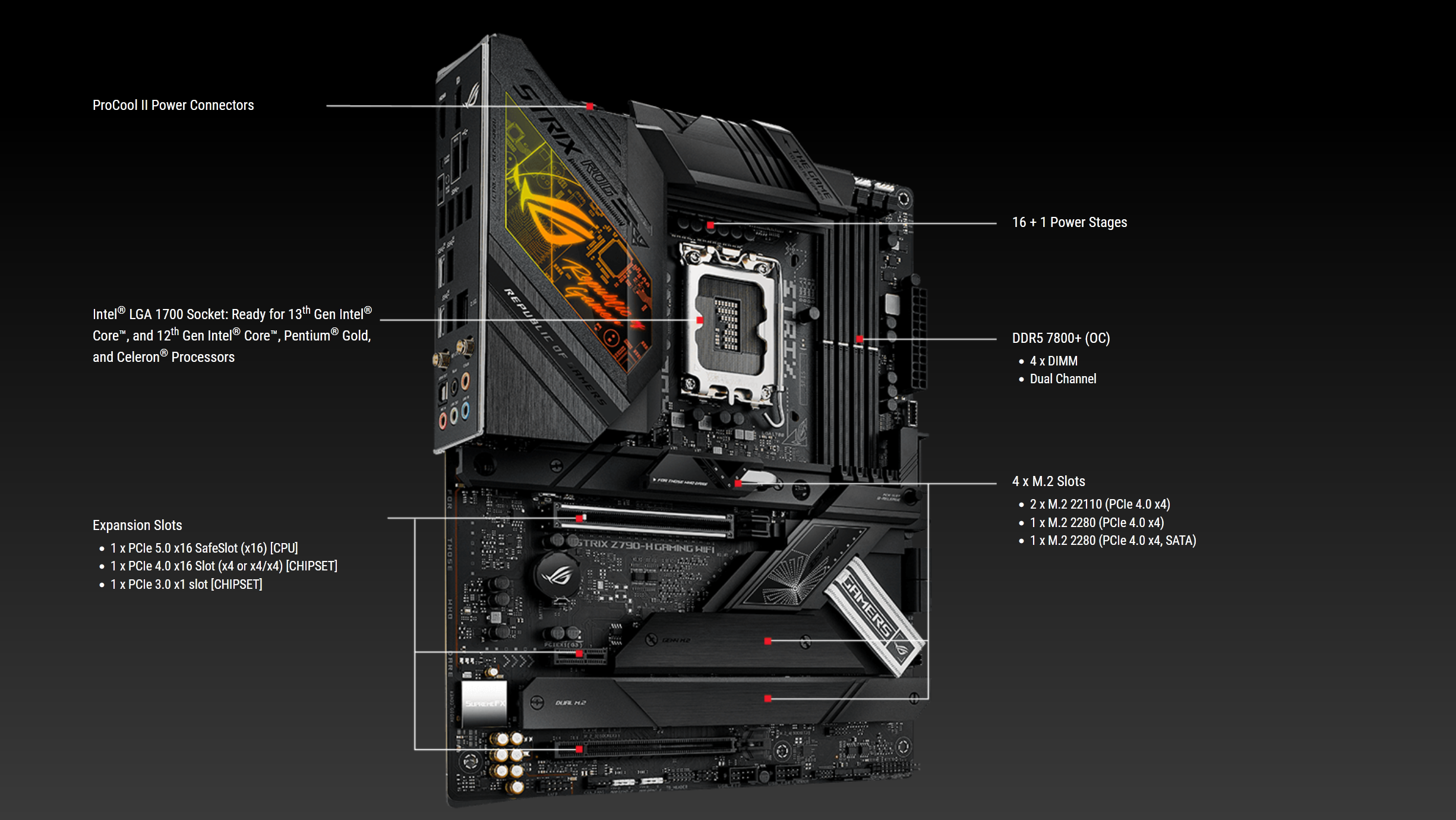
Review: ROG STRIX Z790-H GAMING WIFI

Soluții pentru problemele tale IT

In mod implicit, atunci cand instalezi aplicatia WhatsApp pe telefon, funcția de download a documentelor primite direct in galerie este activa. Iata cum oprești salvarea fisierelor media din WhatsApp in galeria telefonului:
[mai mult...]The steps for enabling Screen Distance on the iPhone and the iPad are identical. You go to the Settings app, navigate to Screen Time, and enable Screen Distance. Let’s walk through the steps for enabling this feature on an iPhone.

Inside Screen Time, open the Screen Distance setting.

When enabling Screen Distance for the first time on the iPhone or iPad, your device will prompt you with two additional steps. On the first screen (shown below), it gives a brief explanation of Screen Distance. Press Continue to resume the setup.

On the next page, the device will continue to explain the Screen Distance feature further and give details about its functionality. Click on Continue to complete the setup and enable Screen Distance on your iPhone.

Screen Distance is now enabled on your iPhone.
[mai mult...]