
Soluții

How to Enable .NET Framework 2.0 and 3.5 in Windows 11

To enable .NET Framework 2.0 and 3.5 on Windows 11:

  1. Search the Start menu for “optionalfeatures” and open it.
  2. Check the “.NET Framework 3.5 (includes .NET 2.0 and 3.0)” box and click “OK.”
  3. Select “Let Windows Update Download the Files for You.”
  4. When the files are installed, reboot your PC.

If you’re having trouble launching certain apps on your Windows 11 PC, your system may not have the required NET Framework versions installed. It’s easy to install .NET Framework version 2.0 and 3.5 to fix your app issues.

[mai mult...]
How to Upload an Instagram Reel From a Computer

To upload reels from your computer, visit Instagram.com in your preferred web browser, sign in to your account, select “Create” on the left, choose “Select From Computer,” and select your video file. You’ll have the option to trim or crop the video before uploading it as a reel.

Have you made an Instagram Reel video on your computer and don’t want to transfer it to your phone to then upload it to the site? Don’t worry, there’s a way to upload Reels to Instagram directly from your Windows, Mac, Linux, or Chromebook computer.

[mai mult...]

How to Find and Delete Your Google Assistant Voice History

To delete your Google Assistant voice history, head to the Google Assistant Activity site, find the entry you want to delete and select “X” next to it. To delete your entire history, choose Delete > Delete All Time, and confirm by selecting “Delete.”

Whether you’re privacy-conscious, or you just don’t want Google keeping a historyof your voice conversations with its Assistant, it’s easy to delete your voice data from Google. Here’s how to do just that on both your desktop and mobile.

Once you’ve accessed your voice data, you can either delete individual interactions you’ve had with Assistant, or you can delete all your Assistant activities.

[mai mult...]

Windows 11 actualizează panoul de widgeturi

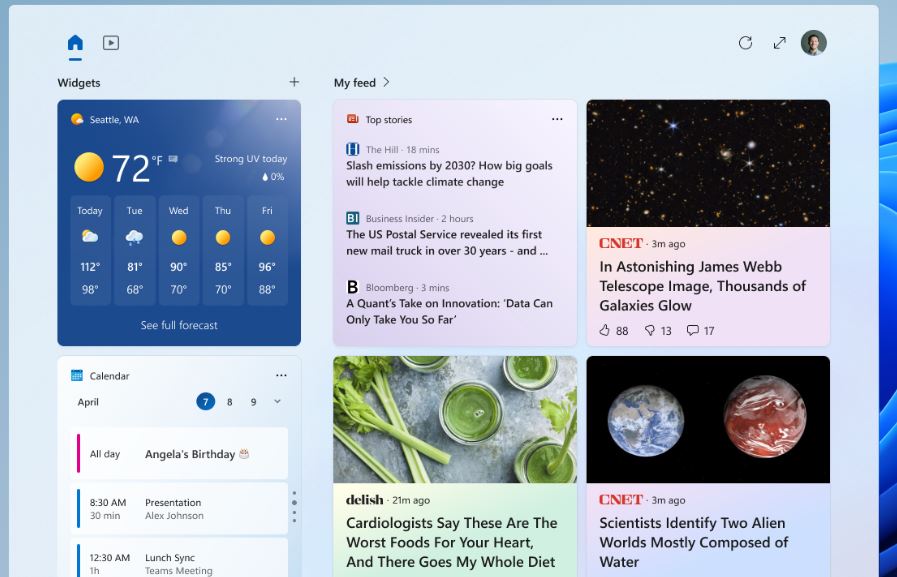
Windows 11 evoluează în mod constant, iar acum și funcțiile sunt lansate mai rapid. Microsoft actualizează din nou panoul de widgeturi, de data aceasta pentru a utiliza mai bine spațiul de pe ecran.

Windows 11 a introdus panoul de widgeturi, care este accesibil de la un nou buton din bara de activități și afișează o grilă de widgeturi personalizabile. Windows 11 Insider Preview Build 25324 este acum distribuit pe canalul Windows Insider Canary și are o versiune actualizată a tabloului cu trei coloane – dacă ecranul PC-ului dvs. este suficient de mare.

Poate că vă amintiți că Microsoft a experimentat cu un panou de widget-uri pe tot ecranul în septembrie 2022, dar acel experiment nu a părut să treacă dincolo de versiunile Insider builds. Acest nou design folosește în continuare doar partea laterală a ecranului, fără a acoperi întregul desktop.

Mai mult spațiu pentru widget-uri este un upgrade, dar acest aspect actual reduce de fapt cât spațiu primesc widget-urile în panou, pentru a face loc pentru articolele recomandate. Să sperăm că Microsoft va continua să ajusteze acest aspect, deoarece există deja suficient conținut recomandat în meniul de căutare din bara de activități.

[mai mult...]