
Windows Server

Active Directory 95 Solutii

Group Policy 89 Solutii

WSUS 41 Solutii

Sharepoint Server 40 Solutii

Basic 72 Solutii

Hyper-V 34 Solutii

How to give ShutDown rights only to certain users/groups using GPO in Windows Server 2012

Press Start and type gpmc to start Group Policy Management Console and press Enter.

In the new window, right click either on your domain, or on th OU for which you want to apply the policy to and click on Create a GPO in this domain, as in the following image, and type the name you want for it.


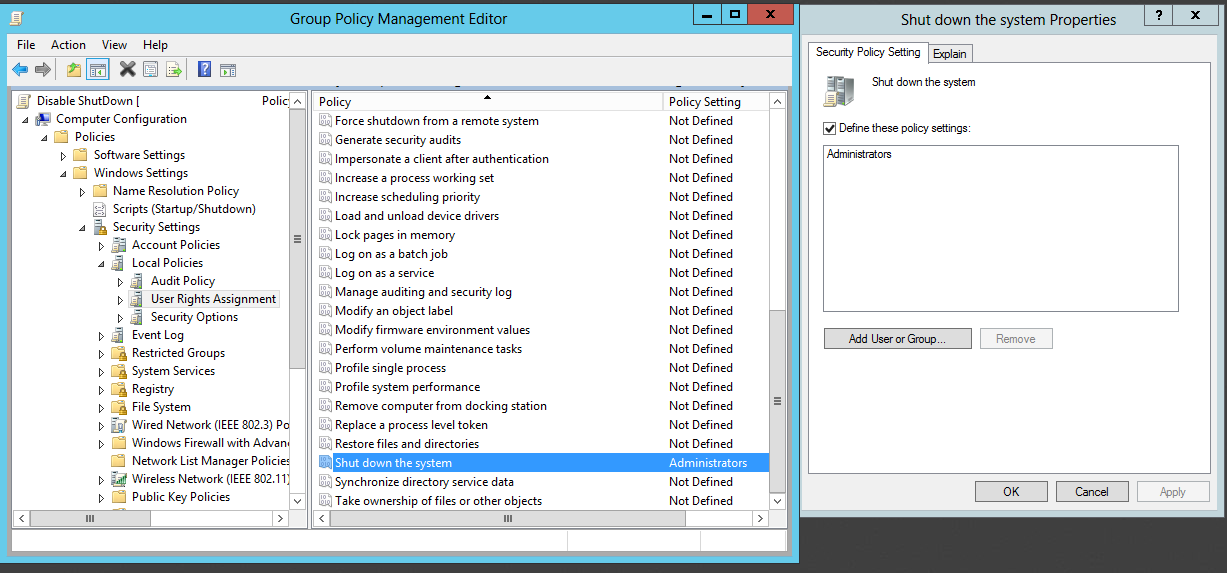
Next step is to right click on the newly created GPO and choose Edit, and in the GPME window scroll down to Computer Configuration>Policies>Windows Settings>Security Settings>Local Policies>User RIghts Assignment and look for the Shut down the system option on the right side of the screen, double tap it and add the Users or Groups to which you want to give shut down rights.
[mai mult...]

Fix errpr DX11 feature level 10.0 is required to run the engine

The error “DX11 feature level 10.0 is required to run the engine” appears when the system does not have the appropriate Direct3D Hardware Feature Level required by the game engine. This particular error message is signaling that the application engine is unable to use Direct 3D Feature Level version 10.0.If the operating system has the latest DirectX version, the error is usually a sign that the GPU doesn’t meet the minimum system requirements or is running on outdated driver software. Users will encounter this error when trying to run games and other applications that require extensive graphical processing.

[mai mult...]