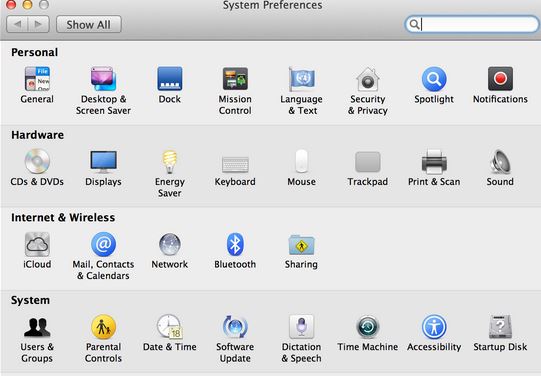
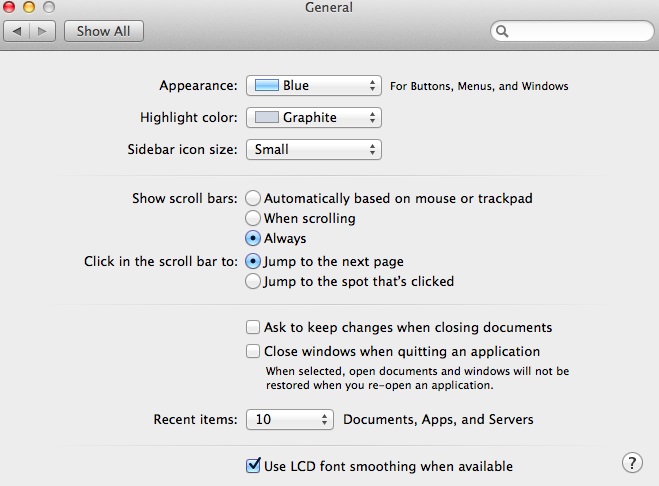
Setare Scroll Bars in OS X . Data 01/08/2014 Autor Mihai O Categorie OS - OS X, Stații de lucru 8 1287 Configurare noua (How To) SituatieMereu il cauti si nu-l gasesti? Uite cum il poti face sa fie mereu activ! Solutie Pasi de urmat Se va merge in folderul System Preferences din meniul Apple colt stanga sus Se va alege General si se va selecta Always din meniul “Show scroll bars” Spor la navigat! 🙂 Tip solutiePermanent Voteaza Up Down (50 din 91 persoane apreciaza acest articol) ShareTweetShare Despre Autor Mihai O Solutii Asemanatoare What is OpenClaw? Reviving a classic through open technology 5 How to install and configure Gentoo Linux -2 Cheaper QD-OLED is finally happening 1 How to create a Windows to go with Rufus to run Windows 11 from USB 3 Cum îți faci un raport complet al PC-ului cu PowerShell 10 Cum vezi toate procesele care pornesc automat cu Windows 1 Leave A Comment? × Cancel Reply Save my name, email, and website in this browser for the next time I comment. + three = ten
Leave A Comment?