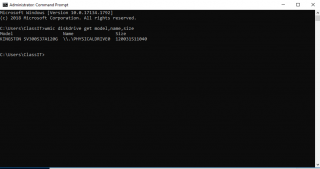
Cum verificam cate hdd-uri avem utilizate cu ajutorul WMIC Data 29/10/2020 Autor Costinel Cirstea Categorie OS - Windows, Soluții -2 449 Configurare noua (How To) SituatieDorim sa verificam cate hdd-uri avem existente pe un pc. Solutie Pasi de urmat Intram in start si scriem cmd, apoi il rulam cu drepturi de administrator: Rulam comanda: wmic diskdrive get model,name,size Tip solutiePermanent Voteaza Up Down (12 din 26 persoane apreciaza acest articol) ShareTweetShare Despre Autor Costinel Cirstea Solutii Asemanatoare Remediere: Apple CarPlay not working 5 Rezolvare: Face ID not working on iPhone 4 Rezolvare: Microsoft Intune not working or opening 4 Remove ads from Windows search -1 Don’t update your encrypted Windows PC unless you know your BitLocker password 4 How to Connect Two AirPods to a Mac or Windows PC 1 Leave A Comment? × Cancel Reply Save my name, email, and website in this browser for the next time I comment. eight − = 7
Leave A Comment?
