
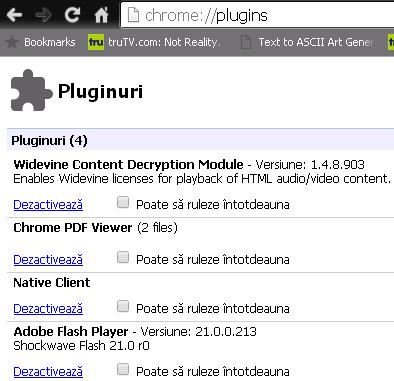
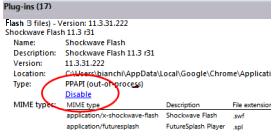
Dezactivare “PepperFlash” plugin in Chrome Data 13/11/2017 Autor Daniel Chr Categorie Aplicații, Configurare program -3 1130 Configurare noua (How To) SituatieUltimile update-uri ale browser-ului Google Chrome, folosesc pluginul “PepperFlash” in locul “Adobe Flash” Foarte multe aplicatii nu functioneaza cu “PepperFlash”. Cum il dezactivam? Solutie Pasi de urmat Deschidem un tab nou si scriem chrome://plugin Gaseste “+Details” in partea din dreapta. Gaseste in Plugin-uri “Flash”. Pot fi una, doua sau trei file in aceasta selectie. In partea de jos, selectam “Disable” Tip solutiePermanent Etichetare: Adobe Flashaskitaskit.rochromeDezactivare "PepperFlash" plugin in Chromegoogle chromepepperflashpluginsetari chrome Voteaza Up Down (19 din 41 persoane apreciaza acest articol) ShareTweetShare Despre Autor Daniel Chr Solutii Asemanatoare The new AI feature of Kaspersky Premium Antivirus 3 5 Gmail features you can turn off -2 7 of the least-known Excel charts and why you should use them -4 5 Outlook tools that save me time every single day 2 How to build a “pro” dashboard engine with excel 7 Configurare Proxmox VE după instalare: Update-uri gratuite și curățare erori -1 Leave A Comment? × Cancel Reply Save my name, email, and website in this browser for the next time I comment. nine − three =
Leave A Comment?