
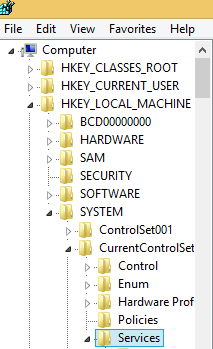
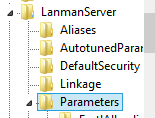
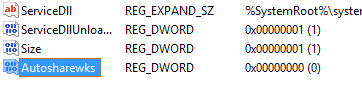
Dezactivare share-uri administrative Data 12/06/2015 Autor Radu P Categorie OS - Windows, shareuire si mapare, Stații de lucru -18 1952 Configurare noua (How To) SituatieSe doreste dezactivarea share-urilor administrative de pe o statie Solutie Pasi de urmat Se deschide regedit Se navigeaza la HKEY_LOCAL_MACHINE – SYSTEM – CurrentControlSet – Services Se navigheaza in continuare la LanmanServer – Parameters Se da click dreapta new – dword (32-bit) value Se denumeste autosharewks si se lasa valoarea 0 Se da restart la calculator Tip solutiePermanent Voteaza Up Down (21 din 60 persoane apreciaza acest articol) ShareTweetShare Despre Autor Radu P Solutii Asemanatoare Diagnosticarea și rezolvarea erorii „Kernel panic – not syncing: Attempted to kill init!” 0 Diagnosticarea și rezolvarea erorii „Bus error (core dumped)” în Linux 3 4 Excel tools you won’t find on the ribbon -2 How to use claude to build automations in Excel 5 Shortcut close the current tab in Google Chrome v2 4 Shortcut maximize the current window of Google Chrome 2 Leave A Comment? × Cancel Reply Save my name, email, and website in this browser for the next time I comment. 9 × = thirty six
Leave A Comment?