
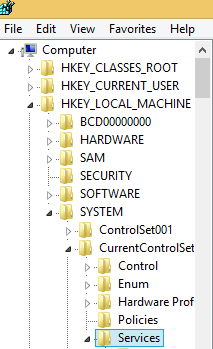
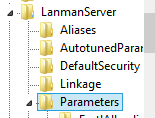
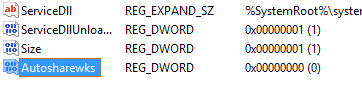
Dezactivare share-uri administrative Data 12/06/2015 Autor Radu P Categorie OS - Windows, shareuire si mapare, Stații de lucru -16 1881 Configurare noua (How To) SituatieSe doreste dezactivarea share-urilor administrative de pe o statie Solutie Pasi de urmat Se deschide regedit Se navigeaza la HKEY_LOCAL_MACHINE – SYSTEM – CurrentControlSet – Services Se navigheaza in continuare la LanmanServer – Parameters Se da click dreapta new – dword (32-bit) value Se denumeste autosharewks si se lasa valoarea 0 Se da restart la calculator Tip solutiePermanent Voteaza Up Down (15 din 46 persoane apreciaza acest articol) ShareTweetShare Despre Autor Radu P Solutii Asemanatoare Cum oprim monitorul doar cu un simplu click 2 How to enable or Disable Font Smoothing in Windows 11 1 How to fix 0x800f0983 error on Windows 10/11 3 How to enable Windows 11 24H2 updates in WSUS 3 How to enable Windows 11 24H2 updates in SCCM 5 ESP32 Light sensor 1 Leave A Comment? × Cancel Reply Save my name, email, and website in this browser for the next time I comment. + eight = seventeen
Leave A Comment?