
Situatie
When a SharePoint document library is mapped in Windows File Explorer using WebDAV, downloading or copying large files may fail with the following error: Error 0x800700DF: The file size exceeds the limit allowed and cannot be saved. Smaller files may work normally, while larger files fail during the transfer.
Solutie
The issue can be resolved by increasing the FileSizeLimitInBytes value in the Windows Registry.
Step 1 – Open Registry Editor
- Press Windows + R
- Type: regedit
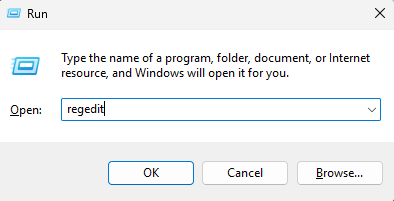
Press Enter and approve the User Account Control prompt if displayed.
Step 2 – Navigate to the WebClient Configuration
Navigate to:
HKEY_LOCAL_MACHINE\SYSTEM\CurrentControlSet\Services\WebClient\Parameters
Step 3 – Locate FileSizeLimitInBytes
In the right pane, locate: FileSizeLimitInBytes
This is a DWORD (32-bit) Value used by the Windows WebClient service.
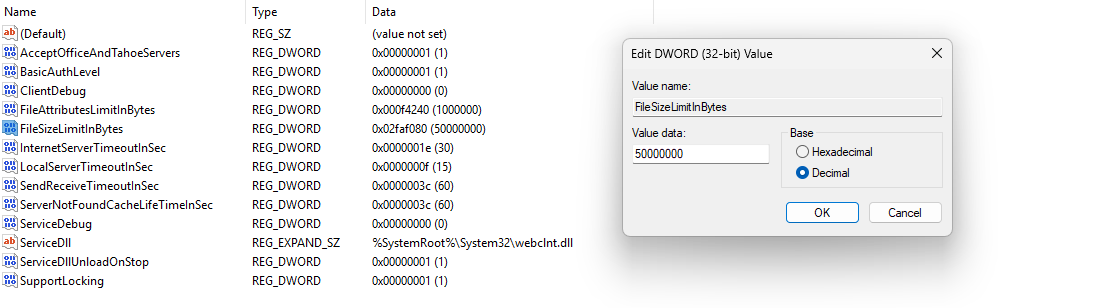
Step 4 – Increase the File Size Limit
- Double-click FileSizeLimitInBytes.
- Select Decimal.
- Change the value to: 4294967295
- Click OK.
This is the maximum value that can be stored in a 32-bit unsigned DWORD and corresponds to approximately 4 GB.
Step 5 – Restart the WebClient Service
The WebClient service must reload the configuration before the new limit takes effect.
Open Command Prompt as Administrator and run:
net stop WebClient
followed by:
net start WebClient
Alternatively, restart the computer.
Important Limitation
Increasing FileSizeLimitInBytes resolves the Windows WebDAV client-side size restriction, but WebDAV itself is not the preferred method for working with SharePoint Online document libraries. Other WebDAV-related limitations, authentication issues, timeouts, or transfer problems may still occur, particularly with large files or large document libraries.
For regular access to SharePoint Online files, using the OneDrive synchronization client or the Add shortcut to OneDrive functionality is generally preferable to mapping the SharePoint library through WebDAV.
Leave A Comment?