
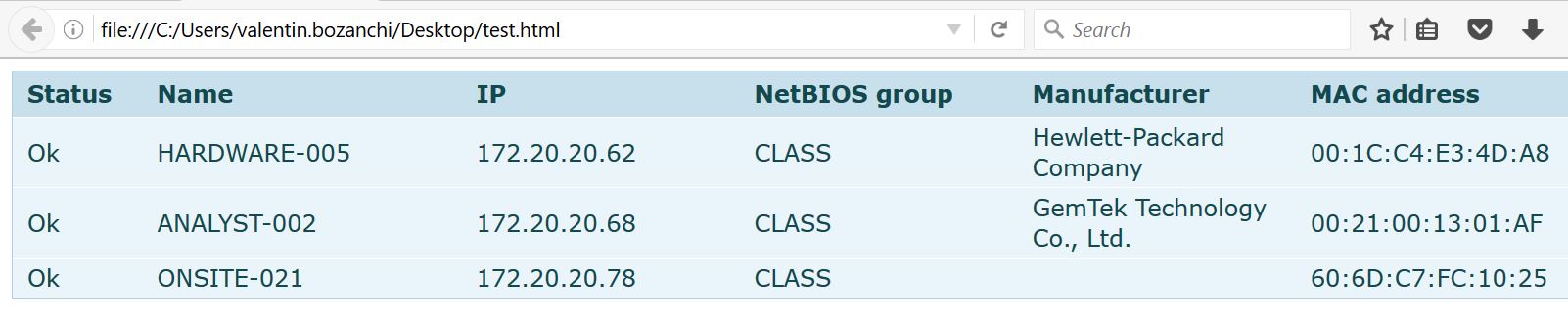
Export scan in format HTML, cu Advanced IP Scanner Data 11/08/2016 Autor Valentin Bozanchi Categorie Hardware, Stații de lucru, Test echipamente retea 1 1705 Configurare noua (How To) SituatieDoresti sa afli ce IP sunt alocate intr-o retea si ulterior exportarea acesteia? Pentru aceasta, urmeaza pasii de mai jos! Backup Nu necesita! Solutie Pasi de urmat Se deschide aplicatia –> dupa scanarea retelei, se apasa butonul “File” –> “Save as” si se alege formatul HTML –> dupa export informatiile pot fi vizibile in felul urmator Tip solutiePermanent Etichetare: Advanced IPaskitaskit.rocu Advanced IP ScannerExport scanExport scan in format HTMLformatul HTML Voteaza Up Down (36 din 72 persoane apreciaza acest articol) ShareTweetShare Despre Autor Valentin Bozanchi Solutii Asemanatoare Shortcut close the current window of Google Chrome 0 Shortcut close the current tab in Google Chrome 0 Shortcut open a new tab and switch to it in Google Chrome 0 Shortcut open a new window in Google Chrome 0 How to back up WSL on Windows 11 via PowerShell 0 How to check if WSL is removed on Windows 11 via PowerShell 0 Leave A Comment? × Cancel Reply Save my name, email, and website in this browser for the next time I comment. 6 × 2 =
Leave A Comment?